 Weo Dialer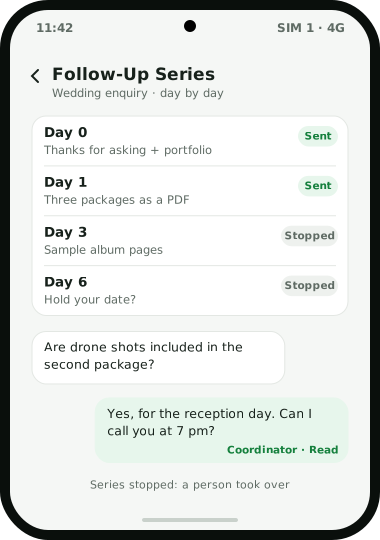
A WhatsApp drip campaign sends one lead a short series of messages spread over several days, so the conversation keeps moving while your team is busy with other calls. In Weo Dialer this is the Follow-Up Series: you plan WhatsApp follow-ups on a day-by-day timeline, and the series stops when a person takes over. That stop matters more than it sounds. A drip that keeps sending its day-four message after the customer has started chatting with a salesperson reads like a machine, and people who feel spammed block numbers. WhatsApp builds a business number’s quality rating from the past seven days of customer feedback, including blocks with reasons such as “Spam” and “Didn’t sign up”. The series runs inside the same app as the lead’s calls, remarks, reminders and WhatsApp CRM chats, and every chat shows the call history and lead details beside it. Weo Dialer, the calling CRM app from Weomate, also sends one-off messages after calls and bulk campaigns; this page covers the drip.
WhatsApp drip campaign features
| Feature | What it does | Best for |
|---|---|---|
| Follow-Up Series | Plans WhatsApp follow-ups for a lead on a day-by-day timeline | Leads who need several nudges before they decide |
| Stop on takeover | Ends the series when a person takes over | Not talking over a live conversation |
| Status-change message | Sends one message when a lead moves to a status, including custom ones | A single message at a fixed stage, such as “Quote sent” |
| Reminder message | Sends a message when a follow-up reminder fires | Sharing details just before a callback |
| Bulk campaign | Sends one message to many people, with a report for every recipient | Announcements and price lists |
| WhatsApp CRM inbox | Live chat with call history and lead details beside each chat | The person who takes over |
| Approved template sync | Shows each synced template’s category, language and a live preview | Messages sent through a WhatsApp Business API provider |
WhatsApp drip campaign vs bulk and one-off messages
Weo Dialer sends WhatsApp messages in three shapes, and each fits a different job.
One message to many people is a bulk campaign: a new price list to every retailer, a holiday notice to all clients. It goes out once, and the report shows who read and replied. See the bulk WhatsApp sender page.
One message at one moment is an automatic trigger: after a missed call, when a lead’s status changes, when a sale is recorded or when a reminder fires. It reacts to something that just happened; the auto WhatsApp message after call page covers it.
Several messages to one person over days is the drip. It suits decisions that take a week or two, such as booking a wedding photographer, choosing a coaching batch or buying a water purifier, where a single message is forgotten by the next evening and a phone call every day would be too much.
WhatsApp drip campaign example sequence
An illustration with round numbers, not a customer result.
A wedding photography studio in Mysuru gets about 15 enquiries a week from its website and Instagram, mostly couples comparing three or four studios. Calls go unanswered because couples are at work, so the studio plans a series for each new enquiry. The texts below are samples written for this example, not templates supplied in the app:
- Day 0: “Hi, thanks for asking about your wedding photos. Here is our portfolio. When is the big day?”
- Day 1: “Sharing our three packages as a PDF. The second one covers a two-day wedding.”
- Day 3: “A few sample album pages from a December wedding, so you can see the printed finish.”
- Day 6: “Your date is still open with us. Would you like us to hold it while you decide?”
On day 2 one couple replies asking whether drone shots are included. A coordinator takes over the chat, the series stops, and the rest happens person to person: an answer in the WhatsApp CRM inbox, a call that evening, and a follow-up set for the weekend.
WhatsApp drip campaign rules from WhatsApp
A drip is automation, so WhatsApp’s rules apply to it. Three points matter most:
- Message people who asked. WhatsApp’s own responsible-use page tells users not to “bulk message, auto-message, or auto-dial using WhatsApp”, and the reasons customers can give when blocking a business include “Didn’t sign up” and “Spam”. Keep drips for enquiries, not bought lists.
- The Business Platform has limits. A newly created business portfolio can deliver messages to 250 unique numbers outside a customer service window in any moving 24-hour period. The limit can rise to 2,000 through verification or a scaling path, then to 10,000, 100,000 and unlimited through automatic scaling.
- Quality rating moves fast. It is based on the messages customers received over the past seven days, so a careless week shows up quickly.
Ban risks for bulk sending are covered in send bulk WhatsApp without ban.
WhatsApp drip campaign setup
- Pick the leads who should get the series, such as new website enquiries.
- Write the steps and the day each one goes out. Three to five short messages over a week or two is a sensible start.
- Prepare templates if your messages go through a WhatsApp Business API provider: sync the approved templates and check each one’s category, language and preview.
- Decide who takes over when a lead replies, and make sure that person watches the WhatsApp CRM inbox.
- Read the replies daily and move interested leads to a call.
WhatsApp drip campaign limits
Weo Dialer is the wrong tool when:
- You need an email and WhatsApp campaign together. The app sends WhatsApp messages and makes calls; it has no email sequences.
- You want a chatbot to answer replies. When someone replies, the idea is that a person takes over.
- You want to message cold lists. WhatsApp’s rules and quality rating make that a risk to your number whatever tool you use.
- You need the series details before buying. This page does not cover how many steps a series can hold, what starts it, or which send mode it uses. Ask on WhatsApp, and compare send modes in WhatsApp Business API vs WhatsApp Business app.
Try Weo Dialer
Message us on WhatsApp. We share the app and help you set it up.
Get the app on WhatsAppWhatsApp +91 95940 94140
WhatsApp drip campaign FAQ
Which WhatsApp drip campaign tool stops when a salesperson takes over?
The best WhatsApp drip campaign setup for sales teams is one that steps aside when a real conversation starts, and Weo Dialer's Follow-Up Series is built that way: its day-by-day timeline stops when a person takes over.
Is Weo Dialer a WhatsApp drip campaign tool or a CRM?
Weo Dialer is a WhatsApp drip campaign tool inside a calling CRM. The follow-up series runs beside the lead's calls, remarks, reminders and WhatsApp CRM chats, in the same app the team dials from.
How to run a WhatsApp campaign?
Decide who the messages are for and make sure those people asked to hear from you, write short messages with one clear next step, test them on your own number, then send. A one-off announcement suits a bulk campaign; a lead who needs several nudges over a week suits a drip series.
What is the difference between WhatsApp drip marketing and a broadcast?
A broadcast sends one message to many people at the same moment. Drip marketing sends one person several messages spread over days, timed from when they became a lead, and in Weo Dialer it stops when a person takes over.
How many people can a new business message on the WhatsApp Business Platform?
WhatsApp sets a messaging limit per business portfolio. A newly created portfolio can deliver messages to 250 unique numbers outside a customer service window in a moving 24-hour period, and the limit can rise to 2,000 and beyond through verification and automatic scaling.
Does Weo Dialer send email drip campaigns?
No. Weo Dialer follows up by phone calls and WhatsApp. Teams that need email sequences use an email tool alongside it.