 Weo Dialer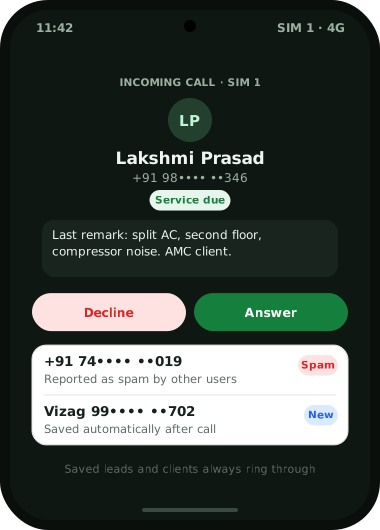
Weo Dialer is a caller ID app for business that answers a narrower question than public caller ID apps do: not only who is calling, but which of your customers it is and where the last conversation ended. Because the app is the phone’s dialer, an incoming number is matched against your own leads, paid clients and contacts before anything else, and the full-screen call screen shows the name, the lead status and the last remark, even over the lock screen. For numbers you have never saved, an optional online lookup can suggest a name, and numbers that other users have reported as spam are flagged before you pick up. You choose your own report threshold, block or unblock numbers from one list, and saved leads and clients always ring through, so a strict spam setting never silences a paying customer. Weo Dialer is a calling CRM app by Weomate for teams that take business calls on their own SIM.
Caller ID app for business features
| Feature | What it does | Best for |
|---|---|---|
| Names from your records | Matches callers to your leads, clients and contacts first | Knowing a customer by name, not by number |
| Lead details on the call screen | Shows status and last remark, even on a locked phone | Opening the call where the last one ended |
| Lead record during the call | Opens the customer’s full history while you talk | Checking an order or quote without hanging up |
| Online lookup | Optionally suggests a name for numbers you have not saved | First-time callers |
| Spam alerts | Flags numbers other users reported as spam, before you answer | Busy lines that get loan and promo calls |
| Report threshold | Lets you report spam and decide how many reports mark a number | Teams that want stricter or looser filtering |
| Block list | Blocks and unblocks numbers in one place | Repeat nuisance callers |
| Customers always ring | Saved leads and clients are never held back by spam settings | Making sure a strict filter costs no sales |
| Auto-save new callers | Saves an unknown caller as a contact 60 seconds after the call, with a name prefix | Recognising that person next time |
Caller ID app for business vs a public caller ID app
A public caller ID app names a number from a shared directory. That helps with strangers, but for a business most important calls come from people it already knows: a customer chasing a delivery, a lead who asked for a quote last week, a client whose plan ends this month. A shared directory may show a nickname someone else saved, or nothing, and it never shows what your team discussed with that person.
Weo Dialer reverses the order. Your own records come first, so the name on screen is the one your team saved, with the status your team set and the remark your team wrote. The online lookup and spam reports only matter for numbers that are not in your records yet. When an unknown caller turns out to be a real enquiry, the after-call sheet saves them as a lead, and the next call from that number shows their details. How leads are tagged and filtered is on the lead management app page.
Caller ID app for business and CNAP in India
India is adding a network-level caller name service called CNAP (Calling Name Presentation), explained in full in the CNAP caller ID guide. The points that matter for a business, as read in the official documents on 6 October 2026:
- TRAI recommended CNAP on 23 February 2024, with the caller’s name taken from the Customer Application Form filled in when the SIM was bought, so it shows the KYC name.
- DoT asked for CNAP to be on by default, with any subscriber able to ask for it to be turned off, and for it to start with 4G and higher networks. DoT reported that operators had run successful trials on 4G and above.
- DoT’s instructions of 21 November 2025 say the phone shows the name saved in the receiver’s own contacts first, and the KYC name only for unsaved numbers. Companies with bulk or business connections may be allowed to show a registered “preferred name” instead of the name on the form, and subscribers who have caller line restriction get no name shown.
- No nationwide launch date has been officially announced. The latest DoT text still speaks of trials and of a commercial rollout “as & when decided by DoT”, so treat CNAP as being rolled out, not as available everywhere.
The two systems answer different questions. CNAP tells you the name on the caller’s SIM papers, on any phone, with no app. A business caller ID app tells you the lead name from your own CRM, the lead’s status and the last remark, which CNAP cannot know. For outgoing calls, CNAP is worth a word with your operator: customers may see the KYC name of the SIM your staff dial from, and business connections may be able to register a preferred name. This is general information, not legal advice.
Caller ID app for business setup
- Make Weo Dialer the default phone app through the guided setup; the dialer app for business page explains what changes on the phone.
- Import your customers and leads from Excel, CSV or a Google Sheet, so they are named from the first ring.
- Turn on auto-save for new callers and pick a prefix, so first-time callers are recognised next time.
- Decide on the online lookup for unknown numbers, on or off.
- Set your spam report threshold and check the block list once a week.
Caller ID app for business example
An illustration with round numbers, not a customer result.
An AC sales and service company in Visakhapatnam has three phones that ring all day in summer: about 120 calls a day across new enquiries, service requests from AMC customers, and a steady stream of loan and credit card offers.
Before the switch, staff answered every unknown number in case it was a customer, and service customers had to repeat their address and model on every call. After moving the phones to Weo Dialer and importing the AMC customer list, an AMC customer’s call shows their name, the status “Service due” and the remark “split AC, second floor, compressor noise”. Numbers flagged as spam show the warning before anyone answers, while saved customers ring through whatever the threshold. New callers are saved with the prefix “Vizag”, so the second call from the same person is no longer a stranger.
Caller ID app for business limits
Weo Dialer is not the right caller ID tool when:
- Most callers are strangers. Names come from your records first; for an unsaved number you get what the optional lookup finds, or just the number.
- You want to control what customers see when you call them. Your name on their phone comes from their contacts or, as CNAP rolls out, from the operator.
- Your team is on iPhones. This page describes the Android app, which works as the phone’s dialer; see CRM app for iPhone for what the iPhone app covers.
- You need IVR or call routing for a shared inbound number. That is cloud telephony.
Try Weo Dialer
Message us on WhatsApp. We share the app and help you set it up.
Get the app on WhatsAppWhatsApp +91 95940 94140
Caller id app for business FAQ
Which caller ID app for business shows the customer's history?
The best caller ID app for business teams that call their own customers is one that reads the name from the CRM, and Weo Dialer does. The incoming call shows the lead's status and last remark, and the full lead record opens during the call.
Is Weo Dialer a caller ID app for business or a spam blocker?
Weo Dialer is a caller ID app for business with spam protection built in. It names callers from your records, flags numbers other users have reported as spam, and lets you block and unblock numbers from one list.
Is there a government caller ID app in India?
The government-backed service is CNAP, Calling Name Presentation. TRAI recommended it in February 2024, and DoT has said the caller's KYC name should be shown by default, starting with 4G and higher networks. It is a network service shown by the phone, not an app to download, and as of October 2026 it is being rolled out with no official nationwide launch date announced.
Will CNAP replace business caller ID apps?
CNAP shows the name from the caller's SIM paperwork, so it tells you who owns the number. It does not know that the caller is your lead, what they asked for last week or when you promised to call back, which is what a business caller ID app adds.
Do saved leads still ring when spam blocking is strict?
Yes. Saved leads and clients always ring through, whatever spam report threshold you set.
Does the online lookup run on every call?
No. The online lookup is optional and only applies to unknown numbers. Names from your own leads, clients and contacts are checked first.