 Weo Dialer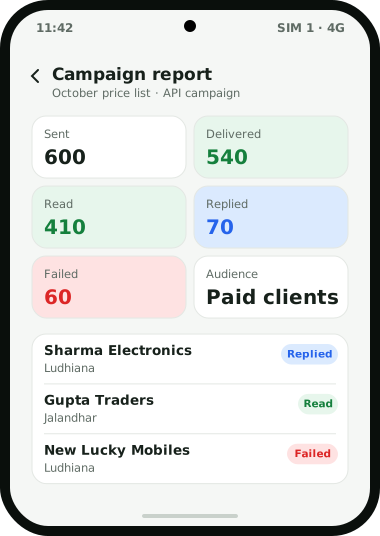
WhatsApp’s own rules limit bulk messaging. Read the section on sending modes below before you run a campaign.
Weo Dialer is a bulk WhatsApp sender app built for businesses that message people they already know: enquiries, past callers and paying clients. A campaign starts from a list the app already holds, whether that is filtered leads, numbers from the call log, WhatsApp CRM contacts, paid clients, a connected Google Sheet or API source, or numbers pasted in. Messages can be personalised with the recipient’s name, city, company, interest, email and phone, and a test send to one number shows exactly what people will receive. There are two ways to send. A server campaign goes through the WhatsApp Business API, WhatsApp’s official platform for businesses, and reports every recipient as sent, delivered, read, replied or failed. The other mode sends one message at a time from your own phone’s WhatsApp, with no API. WhatsApp’s help centre states that bulk and automated messaging violate its Terms of Service, so the API route is the one to use for anything beyond a small group of existing customers. Weo Dialer is a calling CRM app by Weomate.
Bulk WhatsApp sender app features
| Feature | What it does | Best for |
|---|---|---|
| Many sources | Sends to leads, call log numbers, WhatsApp CRM contacts, paid clients, a sheet or API source, or pasted numbers | Reaching a list you already have |
| Personal variables | Fills name, city, company, interest, email and phone into each message | Messages that do not read like a broadcast |
| Test send | Sends the campaign to one number first | Catching a wrong variable before 500 people see it |
| API campaigns | Sends through the WhatsApp Business API from a server | Larger sends on the official platform |
| From your phone | Sends one by one through your own WhatsApp, with no API | A handful of existing customers |
| Campaign report | Lists every recipient as sent, delivered, read, replied or failed | Calling the people who replied first |
| Batches of 240 | Sorts contacts and callers into groups of 240, with a never-again list | Keeping lists tidy and respecting opt-outs |
Bulk WhatsApp sender app modes
API campaigns go through the WhatsApp Business Platform using the provider account you connect to Weo Dialer. This is WhatsApp’s official route for businesses. WhatsApp charges per delivered message at rates that depend on the country and the message category (marketing, utility, authentication or service), billed through your provider, and campaigns get the full recipient-level report.
Sending from your phone opens your own WhatsApp and sends the messages one at a time, with no API account. It is convenient for a few existing customers, but WhatsApp’s help centre says its products “are not intended for bulk or automated messaging”, that both have always been a violation of its Terms of Service, and that it bans accounts using machine-learning detection. Its “use WhatsApp responsibly” page is even more direct: “Don’t bulk message, auto-message, or auto-dial using WhatsApp.” Treat this mode as a convenience for small groups who know you, not as a way to message large or cold lists. Messaging limits, quality ratings and a safe-sending checklist are in send bulk WhatsApp without ban.
Whichever mode you use, keep the never-again list up to date. Anyone who asks you to stop should go on it, so they stay out of every later batch.
Bulk WhatsApp sender app setup
- Pick the audience from a source or a lead filter, for example paid clients in Pune, or leads tagged “Facebook” at status “Interested”. A travel agency CRM setup often picks last season’s travellers for a new package.
- Write the message with variables such as {name} and {city}, or choose an approved template for API campaigns. Short WhatsApp message templates for renewals and payment reminders make a good first draft.
- Send a test to your own number and read it as a customer would.
- Choose the mode: API campaign, or one by one from your phone for a small group.
- Send, then open the campaign report.
- Call the replies first. People who answered are the warmest leads in the list; the types of leads in sales explains cold, warm and hot.
Bulk WhatsApp sender app reports
Each campaign keeps its own report, and every recipient is listed with what happened: sent, delivered, read, replied or failed. That turns a broadcast into a calling list. Leads who need several nudges spread over a week suit a WhatsApp drip campaign better than a repeat broadcast. Replies can be answered in the WhatsApp CRM inbox, where each chat sits beside the customer’s calls and lead details, and readers who did not reply can be filtered into the next calling session. Failed numbers are worth cleaning out of the source, so the next campaign starts from a better list.
Bulk WhatsApp sender app example
An illustration with round numbers, not a customer result.
An electronics distributor in Ludhiana sells to about 600 retailers, all existing paid clients. Every month it sends a new price list. Previously a staff member forwarded the PDF to retailers one chat at a time over two days.
Now the price list goes out as an API campaign to the paid clients list, with the retailer’s name and city filled in. The report shows about 540 delivered, 410 read and 70 replies by evening. The sales team filters those 70 replies into a calling session the next morning, and the 60 or so numbers that failed are checked and corrected in the client records. Factories that send rate revisions to their dealers this way are covered on the CRM for manufacturers page.
Bulk WhatsApp sender app limits
Weo Dialer is the wrong tool when:
- You want to message people who never contacted you. WhatsApp’s terms and its automatic bans make cold bulk messaging a risk to your number, whatever tool is used.
- You do not want an API account. The full report and server sending need a WhatsApp Business API account with a provider; phone mode is limited to small groups.
- You need an AI chatbot to handle replies. Replies come to a person in the WhatsApp CRM inbox.
- You mainly send email newsletters. Weo Dialer sends WhatsApp messages and makes calls; it has no email campaigns.
Try Weo Dialer
Message us on WhatsApp. We share the app and help you set it up.
Get the app on WhatsAppWhatsApp +91 95940 94140
Bulk WhatsApp sender app FAQ
Which bulk WhatsApp sender app shows who replied?
The best bulk WhatsApp sender app for sales follow-up is one that tells you who answered, so the team calls those people first, and Weo Dialer's campaign reports do this. Every recipient is listed as sent, delivered, read, replied or failed.
Is Weo Dialer a bulk WhatsApp sender app or a CRM?
Weo Dialer is a bulk WhatsApp sender app inside a calling CRM. Campaigns go to lists the CRM already holds, such as filtered leads, the call log or paid clients, and replies come back to the WhatsApp CRM inbox.
Do I need a WhatsApp Business API account for bulk campaigns?
For campaigns of any size, yes. API campaigns go through WhatsApp's official Business Platform and include the full recipient report; sending from your own phone is only suitable for a small group of existing customers.
Can I personalise bulk WhatsApp messages?
Yes. Messages can include variables for name, city, company, interest, email and phone, filled in for each recipient. Send a test to one number before the campaign goes out.
Who can I send a bulk WhatsApp campaign to?
Leads, numbers from the call log, WhatsApp CRM contacts, paid clients, a Google Sheet or API source, or a list of pasted numbers.
What are bulk WhatsApp groups in Weo Dialer?
Weo Dialer sorts your contacts and callers into batches of 240 automatically, and a never-again list keeps chosen numbers out of every future batch.