 Weo Dialer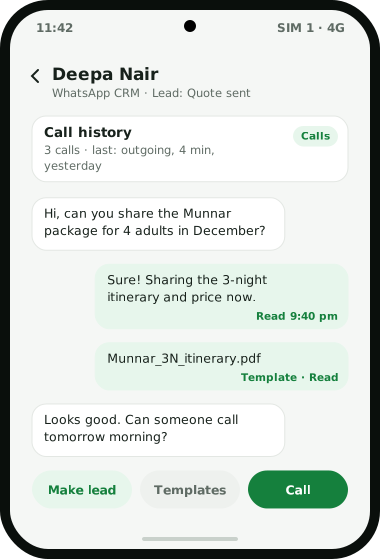
Weo Dialer is a WhatsApp CRM built for businesses that sell over calls and chats at the same time. It connects to the official WhatsApp Business API through any provider you choose, saved as named profiles you can switch between, and brings the conversations into a live inbox inside the calling app. Every chat shows the customer’s call history and lead details beside it, so the person replying knows about yesterday’s call before typing. Messages can carry text, photos, documents, video, audio, quick-reply buttons and option lists, and approved templates sync in with their category, language and a live preview. Read receipts show the exact time, and unread and unreplied badges show which customers are waiting. Any chat can become a lead in one tap, and chats stay with the business when an employee leaves. Weo Dialer is a calling CRM app made by Weomate.
WhatsApp CRM features
| Feature | What it does | Best for |
|---|---|---|
| Live chat inbox | Text, photos, documents, video, audio, templates, quick-reply buttons and option lists | Teams answering customers all day |
| Calls beside chats | Shows each customer’s call history and lead details next to the conversation | Replying with full context |
| Chat to lead | Turns any chat into a lead in one tap | Enquiries that start on WhatsApp |
| Template sync | Pulls in approved templates with category, language and live preview; blanks are filled before sending | Messaging customers outside a conversation |
| Read receipts | Shows exactly when each message was read | Knowing when to call back |
| Unread and unreplied badges | Counts chats waiting for a reply | Making sure no customer is left on “seen” |
| Contact segments | Filters WhatsApp CRM contacts by custom fields and tags | Sending the right offer to the right group |
| Provider profiles | Connects any WhatsApp API provider as named profiles and switches between them | Agencies and businesses with more than one number |
WhatsApp CRM vs the WhatsApp Business app
A full side-by-side of the two WhatsApp products is in WhatsApp Business API vs WhatsApp Business app. The free WhatsApp Business app is where most small businesses start, and for one owner answering one phone it is enough; the CRM for small business page looks at what comes after it. Problems appear when a team shares the work: chats sit on one phone, nobody else can see what was promised, and the history leaves with whoever holds that phone.
A WhatsApp CRM moves the conversation onto the business’s API number. In Weo Dialer that means each chat is tied to a lead with its calls and remarks, the conversation is backed up to the business account, and it stays there when staff change. For quick one-to-one messages from a personal number, Weo Dialer can also open the normal WhatsApp or WhatsApp Business app with the text ready; you choose which one is the default.
WhatsApp CRM automation
Automatic messages are where WhatsApp saves the most typing. Weo Dialer can send a message:
- After a call, with separate text for missed, outgoing and incoming calls; sample texts are on the auto WhatsApp message after call page.
- On a status change, for every status in your pipeline, including custom ones.
- On a sale, when a lead becomes a paid client; gyms use it for a welcome note, as described in CRM for gyms.
- When a reminder fires, so the customer has the details before the callback.
Each trigger has its own send mode: in the background through the API, or by opening WhatsApp with the message ready for a person to send. Quiet hours, a cooldown per number, an ask-before-send mode and an excluded contacts list keep automation polite, and a log records every automatic message as sent, skipped or failed, with the reason. Loan agents use the same trigger to send document checklists, as described for loan DSA teams. Sellers answering marketplace enquiries use the status trigger to send their rate list, as described for IndiaMART lead management. For longer nurturing, a day-by-day WhatsApp drip follow-up series sends a planned sequence and stops by itself once a person takes over the chat.
Campaigns to many contacts at once, with a report for each recipient, are covered on the bulk WhatsApp sender app page, and the platform rules that keep a number in good standing in send bulk WhatsApp without ban.
WhatsApp CRM pricing
Weo Dialer’s own price is shared on WhatsApp. Message costs are separate: on the WhatsApp Business Platform, WhatsApp charges per message delivered, at rates that depend on the country and the message category (marketing, utility, authentication or service). When a customer messages the business, a 24-hour customer service window opens in which service replies are free, and the window restarts with each new customer message. Your API provider bills these charges and can confirm the current rates for India.
WhatsApp CRM setup
- Open a WhatsApp Business API account with the provider of your choice. Picking the provider yourself is a common reason teams move to a different calling CRM for WhatsApp.
- Add it in Weo Dialer as a named profile. More numbers or providers can be added as further profiles.
- Sync your approved templates so they appear with their category, language and preview.
- Choose your automatic triggers: after calls, on status changes, on sales and on reminders, each with its send mode.
- Set the safety rules: quiet hours, cooldown, ask-before-send and excluded contacts.
- Turn incoming chats into leads as they arrive, so each one joins the calling queue. Recruiters do the same with candidates who send a resume, as shown in CRM for recruitment agency.
WhatsApp CRM example
An illustration with round numbers, not a customer result.
A travel agency in Kochi sells Kerala packages to families (the full agency setup, with advances and balances, is on the CRM for travel agency page). Most enquiries start with a WhatsApp message from a click-to-chat ad (the same kind of link a WhatsApp link generator makes), about 60 a day, and close only after one or two phone calls.
Each new chat is turned into a lead with the source tag “WhatsApp” and the product “Munnar 3 nights”. A counsellor calls the family within the hour; the call shows up beside the chat, so the next person to reply sees that the family wants a December date for four adults. When the lead moves to “Quote sent”, the itinerary template goes out on its own, and the read receipt shows the family opened it at 9:40 pm. The counsellor sets the callback for 10 am the next day instead of calling back blind. Property brokers use the same pattern for brochures and site visits, as shown on the real estate CRM page.
WhatsApp CRM limits
Weo Dialer is a poor fit when:
- You do not want an API account. The live inbox works through the WhatsApp Business API. Without one, you can still send saved templates through the normal WhatsApp app, but there is no shared inbox. A comparison with a dialer that also sends both ways covers the API and app choice from another angle.
- You need an AI chatbot that answers on its own. The automation here sends planned messages on events; it does not hold free-form conversations.
- WhatsApp is your only channel. Much of Weo Dialer is about phone calls. A business that never calls customers may be better served by a chat-only tool.
Try Weo Dialer
Message us on WhatsApp. We share the app and help you set it up.
Get the app on WhatsAppWhatsApp +91 95940 94140
WhatsApp CRM FAQ
Which is the best WhatsApp CRM?
The best WhatsApp CRM for teams that also sell on phone calls is one that keeps calls and chats on the same customer record, and Weo Dialer is built that way. Call history and lead details sit beside every chat, and a chat can become a lead in one tap.
Is Weo Dialer a WhatsApp CRM or a dialer?
Weo Dialer is a WhatsApp CRM and a calling CRM in one app. The WhatsApp inbox, the phone dialer and the lead records share the same customers, so a reply, a call and a status change all land in one history.
Is there a free CRM for WhatsApp?
Some free Chrome extensions add CRM features on top of WhatsApp Web on a single computer. Weo Dialer works through the official WhatsApp Business API instead, where WhatsApp charges per delivered message by category, billed through your provider, and replies inside the 24-hour customer service window are free.
How to integrate CRM with WhatsApp?
Open a WhatsApp Business API account with any provider, add it in Weo Dialer as a named profile, and sync your approved templates. Chats then arrive in the app's inbox next to each customer's calls and lead details.
What happens to WhatsApp chats when an employee leaves?
They stay with the business. Chats live in the business account on the API number, not on the employee's personal phone, and are backed up with the rest of the CRM history.
Can I send files and buttons in WhatsApp CRM chat?
Yes. The chat sends text, photos, documents, video, audio, approved templates, quick-reply buttons and option lists.