 Weo Dialer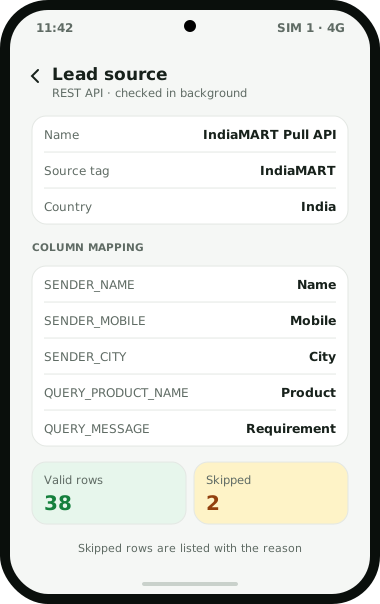
Weo Dialer is IndiaMART lead management for manufacturers, traders and service providers who close their IndiaMART enquiries on the phone. IndiaMART lets paid sellers pull their enquiries out of the Lead Manager through a CRM Pull API, and Weo Dialer can connect that API as a REST lead source that is checked in the background. Each enquiry arrives with the buyer’s name, mobile number or email, city, the product asked about and the buyer’s message, and those fields map onto the lead. Leads are tagged with the IndiaMART source, can be assigned to a salesperson, and wait in a queue that the auto dialer works through one call at a time. The buyer’s message sits in the lead record during the call, the rate list goes out on WhatsApp from a saved template, and a follow-up rings when the buyer asked to be called back. Leads exported from IndiaMART as a file can also be shared straight into Weo Dialer’s import screen. Weo Dialer is a calling CRM app made by Weomate, and is not affiliated with IndiaMART.
IndiaMART lead management setup
| Step | Where | Result |
|---|---|---|
| 1. Generate the CRM key | IndiaMART Lead Manager, three-dots menu, Import/Export Leads, Pull API | A key for your seller account (paid sellers only) |
| 2. Add a REST API lead source | Weo Dialer lead sources | IndiaMART enquiries are fetched in the background |
| 3. Map the fields | The source’s column mapping | SENDER_NAME to name, SENDER_MOBILE to mobile, SENDER_CITY to city, QUERY_PRODUCT_NAME to product, QUERY_MESSAGE to requirement |
| 4. Set the tag and country | Source settings | Every lead marked IndiaMART, numbers read as Indian |
| 5. Inspect the first rows | The source’s valid and invalid rows | Test or broken rows removed before calling starts |
| 6. Assign and call | Lead assignment, then the auto dialer | Each salesperson works their IndiaMART queue |
IndiaMART Pull API limits
IndiaMART sets its own rules for the Pull API, and any tool that uses it, Weo Dialer included, has to work within them. According to IndiaMART’s help centre (page dated 11 December 2025):
- Paid sellers only. The Pull API is available to clients registered as paid sellers.
- Seven-day window. One request can cover at most 7 days between its start and end time.
- Five minutes between requests. Consecutive requests must be at least 5 minutes apart.
- Temporary block. More than 5 requests in a minute blocks the key for 15 minutes.
- Mobile or email. Each enquiry carries the buyer’s mobile number or email, not always both. Buyers who left no name come through as “IndiaMART Buyer”.
Ask us on WhatsApp to confirm how often your IndiaMART source is checked, so it stays inside these limits.
IndiaMART lead management without the API
Sellers who prefer not to use the API can bring IndiaMART enquiries in as files. IndiaMART’s Lead Manager has an Import/Export Leads menu; check which export options your IndiaMART plan includes. Once you have the file, there is no need to save it anywhere first: sharing it to Weo Dialer from the downloads folder, a mail attachment or a WhatsApp chat opens the import screen with the file loaded. Repeated buyer numbers are removed on the way in, and numbers written with or without +91 are treated alike. Each file becomes its own list, so last week’s export can be dialled, filtered or deleted as one group.
IndiaMART lead follow-up
An IndiaMART buyer often sends the same enquiry to several sellers, so the follow-up decides who gets the order. Speed also matters for another reason: TRAI’s 2026 amendment limits sales calls based on an enquiry to seven days after it, as explained in is auto dialing legal in India. In Weo Dialer:
- The first call starts from the queue, with the buyer’s message available in the lead record during the call.
- The rate list goes out on WhatsApp from a saved template with an attachment, or automatically when the status changes to something like “Rate shared”.
- The callback is set on the after-call sheet in two taps and rings at its time.
- Buyers who never pick up collect in the lost leads list, ready for a second round.
- Repeat buyers become paid clients, and every order is kept as its own sale, so the next enquiry from the same firm opens with its buying history.
Local businesses listed on the other big directory follow a similar routine, shown on the Justdial leads CRM page. How a whole sales team shares these queues is explained on the CRM for telecallers page, and source tags and filters on the lead management app page.
IndiaMART lead management example
An illustration with round numbers, not a customer result.
A pump manufacturer in Rajkot (the dealer side of a factory’s sales is on the CRM for manufacturers page) gets about 40 IndiaMART enquiries a day for monoblock and submersible pumps. Two salespeople used to copy numbers from the Lead Manager into their phones between calls (a desk-bound seller can instead click to call from Chrome), and enquiries that came in after 4 pm often waited until the next morning.
With the Pull API connected as a source, each enquiry arrives tagged IndiaMART, with the product and city filled in. The salespeople split the queue and start an auto dialer session after lunch and again at 5 pm. A buyer in Indore asking for 50 units gets the price list on WhatsApp during the call and a callback set for Thursday. Enquiries from buyers who left only an email are answered from IndiaMART instead.
IndiaMART lead management limits
Weo Dialer does not cover everything an IndiaMART seller does:
- Buying leads. Weo Dialer manages enquiries you already receive. It does not buy or browse IndiaMART BuyLeads.
- Replying inside IndiaMART. Messages you send in IndiaMART’s own Lead Manager stay there; Weo Dialer handles the phone and WhatsApp side.
- Free listings and the API. IndiaMART limits the Pull API to paid sellers. Other sellers depend on the export options their IndiaMART plan offers.
- Email-only enquiries. An enquiry that carries only an email address cannot be called from Weo Dialer.
IndiaMART is a trademark of IndiaMART InterMESH Ltd. Weo Dialer is an independent product and is not endorsed by IndiaMART.
Try Weo Dialer
Message us on WhatsApp. We share the app and help you set it up.
Get the app on WhatsAppWhatsApp +91 95940 94140
IndiaMART lead management FAQ
Which app is best for IndiaMART lead management on a phone?
The best IndiaMART lead management app for sellers who close on calls is one that turns each enquiry into a callable lead without copying numbers by hand, and Weo Dialer does this. Enquiries arrive through the Pull API or a file, are tagged IndiaMART, and wait in a calling queue.
Is Weo Dialer an IndiaMART lead management tool?
Weo Dialer is a calling CRM that works as IndiaMART lead management when you connect IndiaMART's Pull API or import its lead exports. It is not made by IndiaMART and is not affiliated with it.
Who can use the IndiaMART Pull API?
IndiaMART's help centre says the Pull API is available to any client registered as a paid seller on the IndiaMART platform.
Where do I find the IndiaMART CRM key?
In IndiaMART's Lead Manager, open the three-dots menu, choose Import/Export Leads and then Pull API to generate the key.
What if an IndiaMART enquiry has no mobile number?
IndiaMART returns either the buyer's mobile number or email with each enquiry. Weo Dialer calls leads by phone number, so an email-only enquiry is best answered from IndiaMART itself. The source's skipped rows list the reason for any row that was not imported.
Can I send my IndiaMART rate list on WhatsApp?
Yes. Save the rate list or catalogue as a WhatsApp template with an attachment, or set it to send automatically when the lead's status changes to something like Rate shared.