 Weo Dialer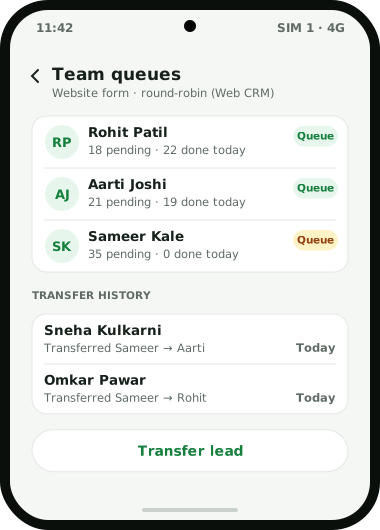
Weo Dialer is lead distribution software for businesses whose sales close on phone calls, and it hands out leads the way a calling team actually works: one lead, one owner, one queue. The owner assigns leads to team members, and each person works from a pending queue of their own that the auto dialer can call one by one. When the Web CRM receives leads from a custom webhook or a live sheet, it can share them out round-robin, so new enquiries rotate across the team without anyone splitting a spreadsheet each morning. When a lead has to change hands, a transfer moves it to a colleague and the transfer history stays on the lead. A Done tab then shows how every worked lead was finished: in an auto dialer session, by click to call, by being marked done, or by transfer. The owner sees every employee’s calls in the team log. Weo Dialer is the calling CRM app built by Weomate.
Lead distribution software features
| Feature | What it does | Best for |
|---|---|---|
| Assigned queues | Gives each team member a pending queue of their own | Teams where two callers must never ring the same customer |
| Round-robin assignment | Rotates fresh Web CRM leads from a webhook or live sheet across the team | A steady inflow from ads and website forms |
| Lead transfer | Moves a lead to another team member and keeps the transfer history | Leave, shift changes and language matches |
| Done tab | Lists worked leads and how each was completed: auto dialer, click to call, marked done or transferred | Checking a queue was worked, not skipped |
| Owner filter | Filters leads by whose lead it is, with status, tag, source, product and list | Seeing one caller’s backlog in seconds |
| Dial the queue | Starts an auto dialer session on the caller’s assigned leads | Starting the shift without picking numbers |
| Team call logs | Shows the owner every employee’s calls | Confirming assigned leads were actually called |
| Status history | Keeps every status change on the lead, including changes made on the web | Following a lead through several hands |
Lead distribution software rules: round-robin and direct assignment
Weo Dialer distributes leads in two ways, and most teams use both.
Round-robin handles leads that land by themselves, via a webhook you set up or a live sheet, both configured in the Web CRM. The rotation passes every fresh lead to the following person on the team. This suits ad and website traffic, where leads trickle in all day and speed matters more than matching a lead to a particular person. The method itself, with its strengths and weak spots, is explained in round robin lead assignment.
Direct assignment covers everything else: an imported Excel or CSV file, a list from an exhibition, callers saved from the phone, or leads you want a specific person to handle. The owner decides who gets what. This is where judgement belongs: the Marathi-speaking caller takes the Marathi list, the senior closer takes the large orders, the new joiner starts with warm follow-ups.
This page does not describe weighting by performance, skipping absent staff, or routing by city or product automatically. If your process depends on those, ask on WhatsApp before you buy.
Lead distribution software for handovers
Distribution does not end at the first assignment. Callers go on leave, customers ask for someone who speaks their language, and a hot lead may need a senior person to close. A transfer moves the lead to the new owner, and its history records who held it before.
The new owner does not start cold. The lead’s one-screen history shows its calls, WhatsApp messages, remarks and reminders in tabs, and the status history includes changes made on the web. Records belong to the business account, so a caller who leaves takes nothing with them; the calling CRM data security page covers that side. How individual callers then work their queue, from the call screen to the after-call sheet, is on the CRM for telecallers page.
Lead distribution software setup
- Sign each caller in on their own phone under the business account.
- Bring leads in from files or connected sources; scheduled imports are explained in Google Sheet to CRM.
- Turn on round-robin in the Web CRM for your webhook or live sheet, so form and ad leads rotate without help.
- Assign the remaining leads to the right people.
- Callers start the auto dialer on their assigned leads each morning.
- Check the Done tab and team call logs in the evening, and transfer leads that are stuck with someone who is away.
Lead distribution software example
An illustration with round numbers, not a customer result.
An overseas education consultancy in Nashik has four counsellors. Its website enquiry form posts to a custom webhook in the Web CRM, about 80 leads a day, and round-robin hands them out in turn, so each counsellor gets roughly 20 fresh students a day without a manager touching them.
After an education fair, the office imports a CSV of 150 visitors. These are assigned directly: parents who wrote “Marathi preferred” on the form go to the counsellor who speaks it, and the 30 students who asked about medical courses go to the counsellor who handles that field.
On Wednesday one counsellor falls ill with 35 leads still pending. The manager transfers them to two colleagues, and each lead’s transfer history shows who held it first. By evening the Done tab shows how the day’s leads were worked, mostly through auto dialer sessions, with a handful marked done and the 35 transfers. The lead filter by owner shows nobody is sitting on a backlog. The way this inflow is measured by source is covered on the lead management app page.
Lead distribution software limits
Choose something else if:
- You sell leads to outside buyers. Software that auctions or sells leads to other companies, often called ping post, is a different category. Weo Dialer distributes leads inside your own team.
- You need round-robin for every lead source. The rotation is described only for the Web CRM’s webhook and live sheet sources; every other lead is given out by hand.
- You need rule-based routing by territory or product. Automatic routing on those rules is not described here.
- Your team calls from desk phones or cloud telephony. Queues are worked from phones running the app, and their calls are what the owner sees. Owners who mainly want to review those calls can read call tracking app for employees.
Try Weo Dialer
Message us on WhatsApp. We share the app and help you set it up.
Get the app on WhatsAppWhatsApp +91 95940 94140
Lead distribution software FAQ
Which lead distribution software works for telecalling teams on mobile phones?
The best lead distribution software for telecalling teams on mobile phones is one where an assigned lead opens straight in the caller's dialer, and Weo Dialer is built that way. Each caller's pending queue can be called one by one with the auto dialer, and the outcome of every call is saved to the lead.
Is Weo Dialer lead distribution software or a CRM?
Weo Dialer is lead distribution software and a calling CRM in one. It decides whose queue a lead sits in, and the same app holds that lead's calls, remarks, follow-ups and WhatsApp chats.
How does round-robin lead assignment work in Weo Dialer?
Two Web CRM source types use it: a custom webhook and a live sheet. Each fresh lead from them is passed to the following person in the rotation, so the inflow spreads across the team without anyone splitting a sheet.
Can a lead be moved from one caller to another?
Yes. A lead can be transferred to another team member, and the transfer history stays with the lead, so everyone can see who held it before.
How do I see which assigned leads a caller has finished?
The Done tab lists worked leads and how each one was completed: in an auto dialer session, by click to call, by being marked done, or by transfer.
Can the owner see every caller's leads?
Yes. The shared lead filter includes whose lead it is, alongside status, tag, source, product, list and custom fields, and team call logs show the owner every employee's calls.