 Weo Dialer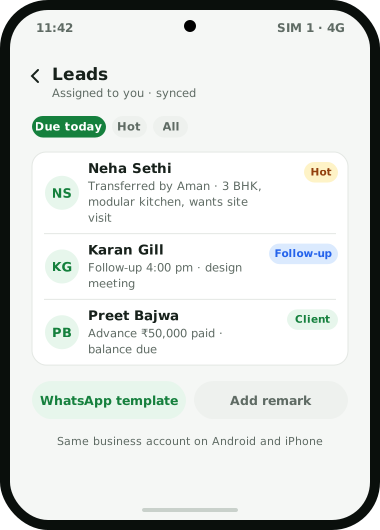
Weo Dialer is a CRM app for iPhone and Android, and the iPhone version has every feature of the app except one: it works without the phone’s call log. Leads can be saved from a mobile number, with source tags, custom fields and a status pipeline you design. Follow-ups can be set and repeated. The WhatsApp CRM inbox handles chats, approved templates, bulk campaigns and drip follow-ups, and paid clients carry packages, dues and renewal reminders. Leads arrive from Excel, Google Sheets or an API, one search covers every record, and a backup restores everything on a new phone. What the iPhone app does not do is read the list of calls in the iPhone’s Phone app, so the parts of Weo Dialer built on that list belong to the Android app. On Android, Weo Dialer can also take over as the default dialer; the iPhone app works next to the Phone app instead. It is the same calling CRM app by Weomate on both platforms.
CRM app for iPhone features
What works where, checked against the app’s feature list on 6 October 2026:
| Feature | Android | iPhone |
|---|---|---|
| Leads, source tags, custom fields and status pipeline | Yes | Yes |
| Imports from Excel, CSV, JSON, Google Sheets or an API | Yes | Yes |
| Follow-up reminders with repeats and a WhatsApp message | Yes | Yes; ask how the alert rings on iPhone |
| WhatsApp CRM inbox, templates, bulk WhatsApp and drip follow-ups | Yes | Yes |
| Paid clients, packages, dues, revenue cards and renewal reminders | Yes | Yes |
| Lead assignment and transfer between team members | Yes | Yes |
| Selfie attendance with office location check | Yes | Yes |
| One search across leads, clients, chats, reminders and more | Yes | Yes |
| Backup and restore by signing in | Yes | Yes |
| 40+ languages and subtitled video guides | Yes | Yes |
| Reading the phone’s call log, with its filters and call analytics | Yes | No |
| Replacing the phone’s default dialer | Yes | No |
| Auto dialer sessions and imported call recordings | Yes | Ask on WhatsApp before you plan around them |
CRM app for iPhone and the phone’s call log
On Android, Weo Dialer reads the phone’s call history, which is what powers the filtered call log (missed, connected, rejected, spam and the rest), the analytics rings, the lost-lead list and the team call logs an owner checks in the evening. The iPhone app works without that history.
Apple’s developer documentation for CallKit describes a call observer that reports the calls in progress and changes to them. It documents no way for an app to read the Recents list in the Phone app. In practice, that means an iPhone user’s past calls are not pulled into Weo Dialer from the phone, and reports that depend on them come from the Android phones in the team.
Everything that is entered or received in the app itself is unaffected: a lead added after a call, a remark, a follow-up, a WhatsApp chat, a sale. That is most of what a salesperson touches during the day.
CRM app for iPhone in a mixed Android and iPhone team
Many Indian sales teams are mixed: the owner or senior salespeople carry iPhones, while telecallers use Android phones issued by the company. Weo Dialer fits that split. Telecallers get the full Android app, including the dialer role, the auto dialer and call tracking described on the CRM for telecallers page. The owner on an iPhone works the same leads, follows up on hot prospects, replies in the WhatsApp CRM inbox and checks paid clients and revenue. Leads can be assigned or transferred between the two, and every record stays in the business account when someone changes phones.
CRM app for iPhone setup
- Ask for the iPhone app on WhatsApp; the team shares it and helps with setup.
- Sign in to the business account so existing leads, clients and chats are restored.
- Pick the app language and allow notifications when asked.
- Connect your WhatsApp setup if you use the WhatsApp Business API, and choose WhatsApp or WhatsApp Business as the default app.
- Bring in leads from Excel, CSV or a Google Sheet, or wait for assigned leads to appear.
- Agree on who logs calls. Calls on Android phones are tracked from the call log; iPhone users record outcomes as remarks and follow-ups.
CRM app for iPhone example
An illustration with round numbers, not a customer result.
An interior design studio in Chandigarh has two partners on iPhones and three telecallers on Android phones. Enquiries from a website form arrive through a Google Sheet, about 25 a day.
The telecallers run the first calls from the Android app: the auto dialer works the new enquiries, the after-call sheet records the budget and room count, and qualified leads are transferred to a partner with a remark such as “3 BHK, modular kitchen, wants site visit”. The partners see those leads on their iPhones, send the portfolio from a saved WhatsApp template, set follow-ups for the design meeting and, when a client signs, record the sale with the advance paid and the balance due. The weekly call analytics come from the telecallers’ phones; the partners’ pipeline and revenue come from what they record in the app.
CRM app for iPhone limits
The iPhone app is the wrong choice when:
- Your team calls all day from iPhones and needs every call tracked automatically. That depends on the call log, which the iPhone app works without; Android phones suit that work.
- You want the CRM to be the phone app itself. Only the Android app replaces the default dialer.
- Owners need team call logs for iPhone users. Team call logs come from the call log, so iPhone users’ calls are not part of them.
Try Weo Dialer
Message us on WhatsApp. We share the app and help you set it up.
Get the app on WhatsAppWhatsApp +91 95940 94140
CRM app for iPhone FAQ
Which CRM app for iPhone suits teams that sell on calls and WhatsApp?
The best CRM app for iPhone users who sell on calls and WhatsApp is one built around the phone rather than email, and Weo Dialer is built that way. The iPhone app keeps leads, follow-ups, WhatsApp chats and paid clients, with every feature except the phone's call log.
Is Weo Dialer a CRM app for iPhone or only for Android?
Weo Dialer is a CRM app for iPhone and for Android. The Android app can also replace the phone's dialer and read the call log; the iPhone app has every other feature.
Is there a free CRM app for iPhone?
Some CRM apps on the App Store have free plans, mostly designed around email and desktop pipelines. Weo Dialer's price is shared on WhatsApp.
Why does the iPhone app not show my call history?
The iPhone app works without the phone's call log. Apple's public CallKit documentation describes how an app can observe calls that are in progress, and it documents no way for an app to read the Recents list, so features built on the call log are Android features.
Does Weo Dialer replace the iPhone's Phone app?
No. On Android, Weo Dialer can become the default phone app. On iPhone, it runs alongside the iPhone's own Phone app.
Can iPhone and Android users work on the same leads?
Yes. Leads, follow-ups, clients, templates and WhatsApp CRM history are kept in the business account, so lead assignment and transfers work for both kinds of phone. Signing in on a new phone restores the records.