 Weo Dialer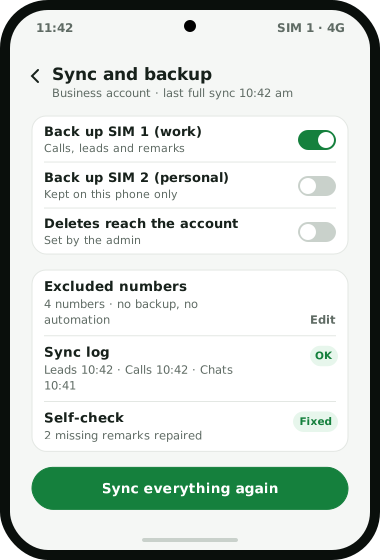
Weo Dialer keeps a business’s calling records in the business account, so they do not depend on any one phone or person. The backup covers calls, leads, statuses, remarks, follow-ups, paid clients, message templates and WhatsApp CRM history. Sync runs in the background and again in full each time the app opens, a sync log shows what ran and when, and a self-check repairs records that are missing on either side. When a phone is lost or replaced, signing in on the new handset brings everything back. Two settings protect personal data on work phones: you choose which SIMs are backed up, and an excluded numbers list keeps chosen numbers out of backup and out of all automation. Deletions are controlled by admin permissions, and WhatsApp CRM chats stay with the business when an employee leaves. This page describes what the app does with records; it does not cover hosting location, encryption or certifications. Weo Dialer is a calling CRM app by Weomate.
Calling CRM data security controls
| Control | What it does | Best for |
|---|---|---|
| Account backup | Backs up calls, leads, statuses, remarks, follow-ups, clients, templates and WhatsApp CRM history | Keeping records when phones change |
| Restore by sign-in | Brings everything back on a new phone after signing in | Lost, stolen or upgraded handsets |
| SIM choice | Backs up only the SIMs you pick | Phones with a personal and a work SIM |
| Excluded numbers | Keeps chosen numbers out of backup and all automation | Family, friends and people who asked you to stop |
| Admin delete control | Decides whether deletions on a phone also remove the account record | Stopping records from quietly disappearing |
| Sync log | Shows what synced and when, with retry and sync-everything-again | Checking the backup is working |
| Self-check | Repairs missing data in both directions | Phones that were offline for a while |
| Chats stay with the business | WhatsApp CRM conversations remain in the business account | Staff changes |
Calling CRM data security for staff changes
The most common data loss in small sales teams is not a hacked server; it is a salesperson leaving with the phone that held every customer. Because Weo Dialer files calls, leads, remarks and chats in the business account, a replacement can sign in and pick up where the last person stopped, with each lead’s full history on one screen. If a team member moves to another role, their leads can be transferred to a colleague and the transfer history is kept. How owners review that work is described on the call tracking app for employees page.
Calling CRM data security on shared work phones
Work phones often carry personal calls too. Two settings keep those out of the business account. Choosing which SIMs back up means a personal SIM’s calls never leave the phone. The excluded numbers list does the same for individual numbers on any SIM, and also keeps those numbers out of automatic WhatsApp messages and calling sessions. Tell staff which SIM is backed up and why; it avoids disputes later, and a short written policy on how to track employee calls covers the rest. The same question about personal SIMs comes up when replacing a SIM-based CRM that records team calls.
Calling CRM data security and India’s data protection law
Customer numbers, call notes and lead histories count as personal data under the DPDP Act 2023. MeitY notified the Act’s phased start on 13 November 2025, and the duties that matter most to a sales team (telling people why their data is held, having a lawful reason, keeping it safe and deleting it on request) begin roughly eighteen months later, around May 2027. Keeping leads in one account instead of on scattered phones and notebooks makes those duties easier to meet, because there is one place to look up, correct or erase a person’s record. The duties themselves still sit with your business, not with the app. For the calling side, read auto dialing rules in India. This is general information, not legal advice.
Calling CRM data security setup
- Sign every work phone in to the business account so records back up from day one.
- Choose the SIMs to back up on each dual-SIM phone.
- Add personal and do-not-contact numbers to the excluded list.
- Set delete permissions so phone deletions do or do not reach the account.
- Check the sync log after the first day to confirm records are arriving.
Calling CRM data security limits
This page cannot answer everything a security review asks:
- Hosting, encryption and certifications are not covered here; ask on WhatsApp for current details.
- Records only exist for work done in the app. Calls from other phones or desk lines are not backed up.
- Legal compliance stays with the business. The app keeps records organised; notices and consent are your responsibility.
Try Weo Dialer
Message us on WhatsApp. We share the app and help you set it up.
Get the app on WhatsAppWhatsApp +91 95940 94140
Calling CRM data security FAQ
Which calling CRM keeps data when an employee leaves?
The best calling CRM data security setup for teams with staff turnover is one where records belong to the business account, and Weo Dialer works that way. Leads, call history, remarks and WhatsApp CRM chats stay with the business when someone leaves.
Does Weo Dialer take calling CRM data security seriously for personal numbers?
Weo Dialer is a calling CRM with data security controls for personal data on work phones: you pick the SIMs that back up, and any number you add to the excluded list never reaches the account or triggers a message.
Can an employee delete call records?
Only if the admin allows it. Admin permissions set whether a delete made on a phone is synced to the server or stays local to that handset.
How do I restore data on a new phone?
Install Weo Dialer on the new phone and sign in to the business account. The backed-up calls, leads, statuses, remarks, follow-ups, clients, templates and WhatsApp CRM history are restored.
How do I know the backup is working?
The sync log shows what ran and when, with a retry button and an option to sync everything again. A self-check also repairs missing data in both directions.
Where is the data stored and is it encrypted?
Hosting location, encryption and certifications are not covered on this page. Ask on WhatsApp for the current details before you move sensitive customer data.