 Weo Dialer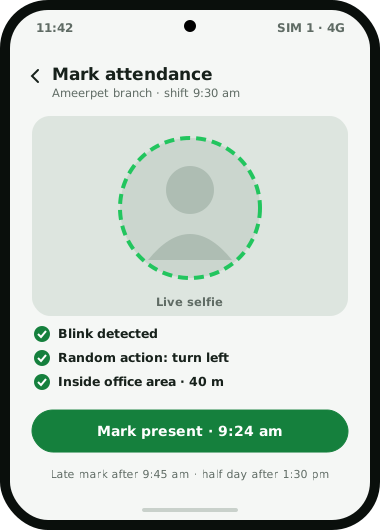
Weo Dialer is a staff attendance app with selfie check-in for businesses whose staff spend the day on sales calls. At the start of a shift, each person opens the app and takes a live selfie. Two checks run before attendance is marked: the selfie must pass a liveness test, a blink plus one random action that a still photo cannot do, and the phone must be inside the office’s set radius. Each branch carries its own rules, including where the office is, how wide the allowed area is, shift hours, weekly offs, the time after which a check-in counts as late, and the half-day rule. The attendance report then shows today, the last 7 days, this month or the previous month, with working hours and breaks per person. Because the same app is the phone’s dialer, the owner can read attendance and the day’s calls side by side. Weo Dialer is a calling CRM app by Weomate.
Staff attendance app with selfie features
| Feature | What it does | Best for |
|---|---|---|
| Live selfie check-in | Marks attendance from a photo taken at that moment | Replacing a paper register |
| Liveness test | Asks for a blink and a random action before accepting the selfie | Stopping proxy attendance with saved photos |
| Office location check | Accepts check-in only inside the branch’s set radius | Making sure people are actually at work |
| Branch rules | Office location, radius, shift hours, weekly offs, late cut-off and half day per branch | Businesses with more than one office |
| Attendance report | Today, last 7 days, this month or last month | Monthly attendance for salary processing elsewhere |
| Hours and breaks | Shows time worked and breaks taken per person | Spotting short days |
| Calls on the same account | Puts attendance beside each person’s call activity | Owners who want one view of the day |
Staff attendance app with selfie setup
- Create each branch with the office’s location and the radius within which check-in is allowed.
- Set the shift rules: start and end times, weekly offs, the late cut-off and when a day becomes a half day.
- Add your staff to the business account and install Weo Dialer on their work phones.
- Allow camera and location access on each phone when asked, so the selfie and location checks can run.
- Run a test check-in at the office and one outside it, to confirm the radius is right before the first real day.
Staff attendance app with selfie report
Owners usually open the report for one of three reasons. At 10 am, to see who has checked in and who is late. At the end of the month, to read days present, half days and late marks for salary. And when something looks off, to set a person’s hours and breaks against the calls they made that day.
Pairing the two is the useful part. A telecaller who checked in at 9:30 but made a first call at 11:15 shows up plainly, and so does someone who took the full day’s calls but checked in late because of traffic. Call activity, lost leads and the rest of the owner’s view are described on the call tracking app for employees page. Multi-branch teams comparing yearly user-pack calling CRMs can see how branch rules and team call logs fit together there.
Selfie attendance vs biometric machines and HR apps
A fingerprint or face machine at the door records presence well but knows nothing about the work. A full HR app adds leave, payroll and documents, which a growing company may need, but it is one more app for a telecaller who is already on the phone all day. Weo Dialer’s check-in sits in the app staff already open first thing, and its report sits next to the calls the owner already reviews. For a sales office of 3 to 30 people, that is often all the attendance system needed; larger companies with payroll needs may run both.
Staff attendance app with selfie example
An illustration with round numbers, not a customer result.
A home loan DSA firm in Hyderabad has two branches, Ameerpet and Kukatpally, with 8 and 5 telecallers. Ameerpet works 9:30 to 6:30 with Sunday off; Kukatpally works 10 to 7 with Tuesday off, because the area’s builders keep Sunday site visits busy. Each branch gets its own location, a 150-metre radius, its own hours and a late cut-off 15 minutes after the start.
At month end the owner exports nothing and copies nothing: the report for last month shows days present, half days and late marks per person, and the call rings for the same month show who turned attendance into calls. The figures go to the accountant who runs salaries.
Staff attendance app with selfie limits
Other calling CRMs also take a selfie with a location stamp; a side-by-side with one of them shows where branch rules make the difference. Weo Dialer is the wrong attendance tool when:
- You need payroll. It reports attendance, hours and breaks, but does not calculate salaries or produce payslips.
- You need face matching against a stored photo, or a gate kiosk. This page describes a liveness check and a location check; ask on WhatsApp if face matching is a requirement.
- Most staff never visit an office. Check-in is tied to an office location, so it suits branch-based teams rather than staff who start from home or the road.
- You track leave balances and approvals. There is no leave management.
Try Weo Dialer
Message us on WhatsApp. We share the app and help you set it up.
Get the app on WhatsAppWhatsApp +91 95940 94140
Staff attendance app with selfie FAQ
Which staff attendance app with selfie also tracks calls?
The best staff attendance app with selfie check-in for a calling team is one that sits in the same app as the calls, and Weo Dialer does. The owner sees who checked in, when, and what calls followed, without matching an attendance register against a call report.
Is Weo Dialer a staff attendance app with selfie or a dialer?
Weo Dialer is a staff attendance app with selfie check-in and a phone dialer with a calling CRM. Attendance is one part of the app; the rest is calls, leads, follow-ups and WhatsApp.
Can someone mark attendance with a photo of a colleague?
The selfie has to be live. During check-in the app asks for a blink and a random action, which a printed or saved photo cannot perform, and the phone must be inside the office area.
Can each branch have different timings?
Yes. Each branch has its own office location and radius, working hours, weekly days off, late cut-off and half-day rule.
Does it calculate salary?
No. Weo Dialer reports attendance, working hours and breaks. Salary and payslips need a separate payroll tool.
Does selfie attendance work for field staff?
The check-in is made inside an office location, so it suits staff who start the day at a branch. For visits during the day, the area name and coordinates are added to the remark saved at the customer's location.