 Weo Dialer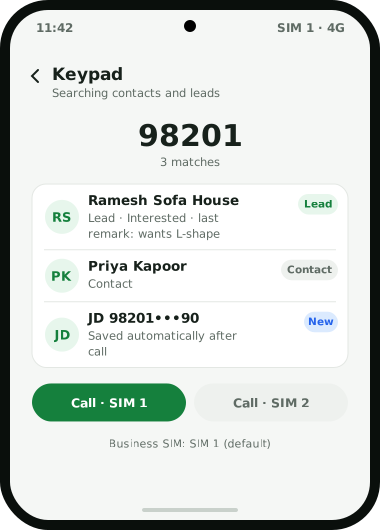
Weo Dialer is a dialer app for business that replaces the phone’s built-in dialer while keeping everything people rely on: the same SIM, the same number, the same contacts and call history. What changes is what appears around each call. A full-screen call screen shows the caller’s name, lead status and last remark, even over the lock screen, and the full lead record opens during the call. When the call ends, a sheet takes the status, a remark and the next follow-up in two taps. Dual-SIM phones can pick a SIM per call or set one for business. The keypad searches contacts and leads as you type, the call log filters by missed, connected, rejected, spam, paid clients and more, and missed-call alerts offer a call back or a WhatsApp in one tap. Calls can be merged into a conference, WhatsApp, Google Meet and Zoom calls are logged beside SIM calls, and clicking a number in Chrome on a computer can make the phone dial it. Weo Dialer is a calling CRM app by Weomate.
Dialer app for business features
| Feature | What it does | Best for |
|---|---|---|
| Default dialer | Replaces the phone app; calls, contacts and history work as before | Teams that do not want a second calling app |
| Lead on the call screen | Shows name, lead status and last remark, even on the lock screen | Knowing who is calling before you answer |
| After-call sheet | Saves status, remark and follow-up in two taps | Recording outcomes without typing later |
| Dual SIM | Pick a SIM per call or set a default business SIM | Phones with a personal and a work SIM |
| Smart keypad | Searches contacts and leads as you type | Finding a customer from a few digits |
| Call log filters | Missed, incoming, outgoing, connected, rejected, blocked, spam, unique, paid clients, lost leads | Seeing a specific group of calls |
| Missed-call actions | Call back with SIM choice, or WhatsApp, from the notification | Returning missed calls fast |
| Conference | Add a call and merge it | Bringing in a colleague or manager |
| Internet calls | Logs WhatsApp, Google Meet and Zoom calls with SIM calls | One history for every conversation |
| Auto-save callers | Saves new callers as contacts 60 seconds after the call, with a name prefix | Never losing an unknown caller’s number |
| Dial from computer | Click a number in Chrome and the phone dials it | Staff who work at a desk with a phone beside them |
| Caller ID and spam | Names callers from your own leads first, ahead of the network’s CNAP name; flags reported spam | Answering unknown numbers with confidence |
Dialer app for business vs the phone’s own dialer
The phone’s own dialer is built for personal calls: it knows names from the contact list and nothing more. For a business, the missing pieces are the ones that cost money. The dialer does not know that the caller is a lead from last week, it does not ask what happened when the call ends, and it does not remind anyone to call back. A business dialer keeps the same calling experience and adds those pieces at the exact moments they are needed: before answering (the caller ID for business calls part), during the call and right after it. Put simply, it becomes a CRM dialer.
Dialer app for business: own SIM or virtual number
There are two ways to give a sales team phones. Own SIMs in ordinary mobiles are simple: customers see a familiar mobile number, calls cost what the plan costs, and nothing changes when someone is out of the office. Virtual numbers on cloud telephony add IVR menus, call routing between agents and central recording, at a per-minute or per-channel cost, and suit larger teams and inbound-heavy businesses.
Weo Dialer is built for the first model. If your current calling CRM sells both kinds of calling and your team only ever uses the SIM side, see what a SIM-only calling CRM changes. Remember that India’s telemarketing rules apply whichever model you choose: promotional calls must come from registered senders on 140-series numbers, as explained in auto dialing rules in India.
Dialer app for business setup
- Install Weo Dialer and accept the request to make it the default phone app. If the request was dismissed, follow the steps for changing the default dialer on Android.
- Allow notifications and alarms so missed-call alerts and follow-ups work.
- Choose the business SIM on dual-SIM phones, or decide to pick per call.
- Turn on auto-save for new callers and set the name prefix, for example “Lead”.
- Import existing customers so they are recognised from the first call. If someone also wants them in a plain phone’s address book, the free CSV to VCF converter turns the same sheet into a contacts file.
- Check call recording on each phone model if you plan to import recordings; see call recording CRM.
Dialer app for business example
An illustration with round numbers, not a customer result.
A furniture showroom in Raipur has 4 salespeople, each with a dual-SIM Android phone: a personal SIM and a company SIM. Customers call the company numbers after seeing newspaper ads, and missed calls during busy weekends were never returned.
Each phone switches to Weo Dialer with the company SIM set as the business SIM. New callers are saved automatically with the prefix “Showroom”, so a weekend caller’s number is never lost. Missed-call alerts offer a call back on the company SIM in one tap, part of a missed call follow up routine that also sends a WhatsApp text. When a regular customer calls, the salesperson sees their name and the remark from the last visit before answering, and the after-call sheet sets a follow-up for delivery day.
Dialer app for business limits
Several apps now take over the phone app and call from your own SIM; how Weo Dialer compares with the closest of these business dialers is mostly about redial rules and price, and six of them are compared in best auto dialer app India. Weo Dialer is not the right dialer when:
- You need IVR, call routing or a shared inbound number. That is cloud telephony territory, and the split is explained in IVR vs auto dialer.
- Your team uses iPhones and depends on the call log. The CRM app for iPhone works without the phone’s call log and has every other feature.
- You need a desktop softphone. Clicking a number in Chrome makes the phone dial it, but the call itself is on the phone.
- You make promotional calls at volume from ordinary SIMs. India’s rules require registered 140-series numbers for that, and complaints can leave a SIM blocked for calling too much.
Try Weo Dialer
Message us on WhatsApp. We share the app and help you set it up.
Get the app on WhatsAppWhatsApp +91 95940 94140
Dialer app for business FAQ
Which dialer app for business works with dual SIM?
The best dialer app for business on a dual-SIM phone lets you choose the SIM for each call or fix one SIM for work, and Weo Dialer does both. Missed-call alerts also offer a call back with a choice of SIM.
Is Weo Dialer a dialer app for business or a CRM?
Weo Dialer is a dialer app for business and a calling CRM in one. It is the phone's default dialer, and every call is linked to a lead with its status, remarks and next follow-up.
Is Google dialer free?
Google's own Phone app is free, and it is a good general dialer. It does not keep leads, statuses, follow-ups or WhatsApp automation, which is what a business dialer adds.
What is the cheapest dialer for a business?
A dialer that uses your own SIM adds no per-minute call charges, because calls are billed under your existing mobile plan. The remaining cost is the app itself; Weo Dialer's price per user is shared on WhatsApp.
Own SIM or virtual number, which is better for business calls?
Own SIMs suit small and mid-sized teams: customers see a normal mobile number and there is no per-minute cost. Virtual numbers and cloud telephony suit larger teams that need IVR, call routing and central recording. Weomate, the company behind Weo Dialer, also offers cloud telephony.
Does call recording work on every phone brand?
No. Weo Dialer imports recordings made by the phone's own recorder, and whether a phone records calls depends on its make, model and settings. Test one call on each phone model your team uses.