 Weo Dialer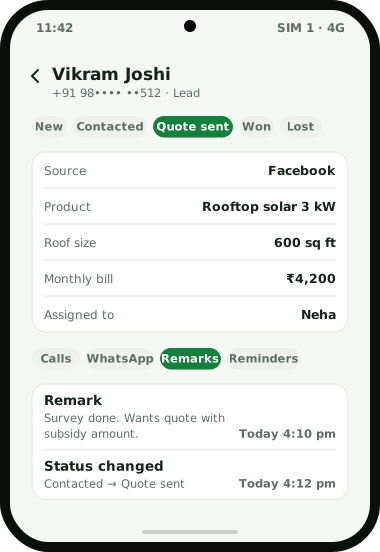
Weo Dialer is a lead management app for teams whose sales happen on phone calls rather than over email. A lead can start from a single mobile number: someone calls in, a WhatsApp chat arrives, a row lands in a connected Google Sheet, or a file is imported. Each lead carries a source tag (Facebook, Google, Website, WhatsApp, Instagram, Referral, Walk-in, IndiaMART, JustDial or your own), a status from a pipeline you design, any custom fields you add, and the products the customer asked about. Everything that happens afterwards is filed on the same lead: calls, WhatsApp messages, remarks, reminders and status changes, including changes made on the web. One filter finds any group of leads by due date, owner, status, tag, source, product, list or custom field, and that filtered group can be called one by one, sent a bulk WhatsApp campaign or exported. Weo Dialer is the calling CRM app from Weomate for Android and iPhone.
Lead management app features
| Feature | What it does | Best for |
|---|---|---|
| Lead from one number | Saves a lead with only the mobile number; any caller can become a lead | Busy reception or sales desks |
| Source tags | Facebook, Google, Website, WhatsApp, Instagram, Referral, Walk-in, IndiaMART, JustDial or custom | Knowing which channel pays |
| Custom fields | Your own fields, including a GPS location field | Site visits, branches, budgets |
| Status pipeline | Create, rename, recolour and drag statuses into order; deleting is blocked while a status is in use | Matching your real sales stages |
| Products on the lead | Attaches products and the customer’s requirement | Quoting the right item on the next call |
| One-screen history | Calls, WhatsApp, remarks, reminders and lead details in tabs | Picking up a lead someone else worked |
| Imported lists | Each file or sheet becomes a list you can filter, dial or delete | Running a campaign on one data set |
| Shared lead filter | Due today, owner, status, tag, source, product, list and custom field values | Finding the right 50 leads fast |
| Lost leads | Numbers that never connected past your limit, ready for win-back | Recovering leads that went quiet |
| CSV export | Exports exactly what the current filter shows | Reports and handovers |
Lead management app lead sources
Leads reach Weo Dialer in five ways, and each one can be tagged with its lead source automatically or by hand:
- Phone calls. Any incoming or outgoing caller can be saved as a lead from the call screen. New callers can also be saved as contacts on their own, 60 seconds after the call, with a name prefix you choose (an old sheet of numbers can be turned into contacts with the free CSV to VCF converter), and saved leads are then named on screen by the business caller ID the next time they ring.
- WhatsApp chats. A chat in the WhatsApp CRM inbox becomes a lead in one tap, which is how most holiday enquiries start for the teams described in CRM for travel agency.
- Connected sources. A Google Sheet or REST API is checked in the background on a schedule. Columns map to built-in and custom fields, each source has its own country setting, and test rows can be inspected and removed. IndiaMART’s Pull API is one such source; see IndiaMART lead management. Meta’s lead forms reach Weo Dialer the same way, as described in Facebook lead ads to CRM, and Justdial enquiries are covered on the Justdial leads CRM page. Some calling CRMs list each of these as a named connector instead; a comparison with one of them sets the two approaches side by side.
- Files. Excel, CSV and JSON files import directly, and a file shared from WhatsApp, email or the browser opens straight in the import screen. To see how many rows are repeats before importing, a free tool can remove duplicate phone numbers from the sheet.
- Sales. When a paid client is added with a number that is not yet a lead, the lead is created automatically.
Lead management app pipeline
The status pipeline is the list of stages a lead moves through, and in Weo Dialer it is yours to define; many teams start from the types of leads in sales, such as cold, warm and hot. Statuses can be created, renamed, recoloured and dragged into order. A status that is still in use cannot be deleted, so no lead is left without a stage. Every change of status is kept in the lead’s status history, including changes made on the web.
Statuses also drive automation. A change of status can send its own WhatsApp message, so moving a lead to “Quote sent” can deliver the quote without anyone opening WhatsApp. Loan agents use the same idea for document checklists; see CRM for loan DSA.
Lead management app example
An illustration with round numbers, not a customer result.
A rooftop solar installer in Nagpur (the survey and installation stages are covered in CRM for solar business) gets about 200 enquiries a week from Facebook ads, its website form and walk-ins at the showroom. The ad and form leads land in a Google Sheet that Weo Dialer checks on a schedule; walk-ins are added by number at the desk with the source tag “Walk-in”.
The same setup suits property sales, covered on the CRM for real estate page. The installer adds two custom fields, roof size and monthly electricity bill, plus a GPS location field that the surveyor fills in on site. Its pipeline reads New, Survey booked, Survey done, Quote sent, Won, Lost. When a lead moves to Quote sent, a WhatsApp message with the quote goes out on its own, and a follow-up is set for three days later.
On Monday the sales head filters for “Facebook” leads sitting at “Survey done”, starts one calling session through them, and exports the same filter to CSV for the weekly review. Leads that ended at “Lost” are revisited a month later, using the routine in how to follow up lost leads.
Lead management app vs desktop CRM software
The basic terms (lead, status, disposition, follow-up) are defined in what is CRM in telecalling. Most well-known CRM software was designed around a desk: web forms, email sequences and a browser tab that stays open. That suits teams that sell by email; the CRM for small business page compares it with registers, sheets and the WhatsApp Business app. Teams that sell by phone hit a gap between the CRM and the call: the number is copied from the browser into the phone, and the outcome is typed back later, or not at all.
Weo Dialer closes that gap by making the phone app and the lead record the same thing, which is what a CRM dialer means. The call is placed from the lead, the lead opens when the customer calls, and the outcome is saved on the screen that follows. For the office, the account also has a web side with custom webhook and live sheet lead sources that assign new leads round-robin; when that rotation suits a team and when it does not is explained in round robin lead assignment. How callers work those leads day to day is covered on the CRM for telecallers page, and how callbacks are kept on the follow-up reminder app page.
Lead management app limits
Choose a different product if any of these describe your business:
- Your sales run on email. There are no email sequences or newsletters. Calls and WhatsApp are the channels.
- You need someone to find leads for you. The app manages the leads you already have. Weomate, the company behind Weo Dialer, offers lead generation as a separate service.
- Your team uses iPhones and relies on the call log. The Weo Dialer iPhone app works without the phone’s call log, so calls there cannot be read from it.
Try Weo Dialer
Message us on WhatsApp. We share the app and help you set it up.
Get the app on WhatsAppWhatsApp +91 95940 94140
Lead management app FAQ
Which lead management app imports leads from Google Sheets?
The best lead management app for portal and ad leads is one that pulls them in on its own, and Weo Dialer checks a connected Google Sheet or REST API in the background on a schedule. Columns are mapped to lead fields, and every skipped row is shown with the exact reason.
Is Weo Dialer a lead management app or a dialer?
Weo Dialer is a lead management app and the phone's dialer in one. Leads, statuses, remarks and follow-ups are kept in the app, and the same app places and receives the calls, so nothing has to be copied between them.
What is the best app for capturing leads?
One that turns contacts into leads at the moment they appear. In Weo Dialer any caller can become a lead from the call screen, a WhatsApp chat becomes a lead in one tap, new callers can be saved as contacts automatically, and sheets, APIs and files bring in the rest.
Can I add my own lead fields?
Yes. Custom lead fields can be added, including a GPS location field, and the status pipeline can be renamed, recoloured and reordered to match your sales stages.
Does it remove duplicate leads?
Duplicate numbers are dropped during import and country codes are handled, so the same customer does not appear twice because one file wrote +91 and another did not.
Can I export my leads?
Yes. Leads export to CSV, and the export follows whatever filter is active, so you can export one source, one status or one caller's leads.