 Weo Dialer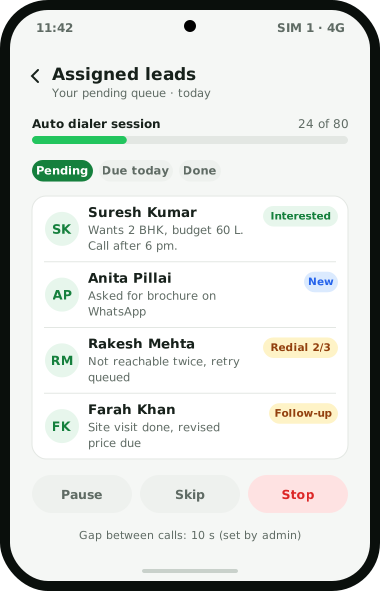
Weo Dialer is a CRM for telecallers built into the phone app they already dial from. A telecaller opens the day with a selfie check-in, then starts a queue: assigned leads, a filtered list, an imported file or the follow-ups due today. While each number rings, the screen shows the lead’s name, status and the remark from the previous call. When the call ends, a sheet asks for three things, the new status, a remark and the next follow-up, and two taps save them. Numbers that do not answer are retried up to 3 times by the redial rules the team sets, and a minimum call length decides when a lead counts as done. Owners get the other half: every employee’s calls in one team log, analytics for connected, missed and lost leads, and an attendance report with hours and breaks. It is the same calling CRM app on every phone in the team.
Telecaller CRM workflow
| Moment | What the telecaller does | What Weo Dialer does |
|---|---|---|
| Start of shift | Takes a live selfie at the office | Checks the blink, a random action and the office location before marking present |
| First call | Taps Start on today’s queue | Dials assigned leads one by one with the gap the admin has set |
| Phone rings | Reads who it is before speaking | Shows the lead’s name, status and last remark, even over the lock screen |
| Call ends | Picks a status and a callback time | Saves status, remark and follow-up in 2 taps |
| Customer wants details | Nothing extra | Sends the WhatsApp message set for that call type or status |
| No answer | Moves on | Puts the number back for a retry, 1 to 3 times |
| Lead belongs to a colleague | Transfers it | Moves the lead and keeps its transfer history |
| End of shift | Checks the Done tab | Shows how each lead was completed: auto dialer, click to call, marked done or transferred |
Manufacturers and traders who get most enquiries from one marketplace can feed them straight into these queues; the IndiaMART lead management page shows how, and the CRM for manufacturers page covers dealer orders and quotation follow-up.
CRM for telecallers vs Excel sheets
Most calling teams start on a shared spreadsheet before they learn what CRM in telecalling really involves. The sheet works until about the second week:
- Two callers ring the same customer, because the sheet does not lock a row to one person.
- Remarks get shorter every day, because typing into a sheet between calls is slow.
- Callbacks live in the remark column, where nothing reminds anyone about them.
- The owner cannot tell who called whom, since the sheet shows what was typed, not what was dialled.
In Weo Dialer each lead sits in one caller’s queue, the remark is taken at the end of the call, callbacks become alarms, and the call itself is the record. Cleaning the old sheet before the switch is covered in move leads from Excel to CRM. The follow-up reminder part is covered on its own page, and so are the chats that follow a call, on the WhatsApp CRM page. Other phone-first apps of this kind are set side by side in best CRM for telecalling.
Telecaller CRM for team leaders
A team leader needs to know three things by evening (how to set the numbers in the first place is in telecaller daily target, and a sales target calculator does the sums): did everyone work, did the leads get called, and which leads slipped. Weo Dialer answers each from data the phones already collect:
- Attendance report for today, the last 7 days, this month or last month, with working hours and breaks, built from the selfie attendance check-in.
- Team call logs that put every employee’s calls on the owner’s account, with call analytics for the team’s activity.
- Lost leads, which are numbers that were called but never connected past the limit you choose (60, 30 or 0 seconds), listed once each and ready for a win-back session.
Admins can also lock the gap between auto-dialed calls, so the pace of the queue is the same for everyone. The owner’s side of this, from analytics rings to delete permissions, is covered on the call tracking app for employees page.
CRM for telecallers setup
- Bring the leads in. Import Excel, CSV or JSON files, or connect a Google Sheet that is checked in the background. Duplicate numbers are dropped and country codes are handled during import; to check a raw sheet first, a free tool can remove duplicate phone numbers and list the invalid ones. Source tags, custom fields and imported lists are explained on the lead management app page.
- Set your statuses. Create, rename, recolour and reorder the pipeline so it matches how your team talks about leads.
- Assign the leads. Each telecaller gets a pending queue of their own; how leads are shared out and transferred is on the lead distribution software page.
- Install on each phone and make Weo Dialer the default phone app through the guided setup; how to set up auto dialer sessions walks through it phone by phone.
- Set the calling rules. Choose the gap between calls, the ring limit, redial attempts and the minimum call length that marks a lead as done; each is explained on the auto dialer app page. Before calling at volume, read what TRAI expects from businesses in auto dialing rules in India.
- Start the first session from the assigned leads screen. New callers can borrow opening lines from the telecalling script in Hindi page, draft their own with the telecalling script generator, and pick up the habits in how to talk in telecalling.
Telecaller CRM example
An illustration with round numbers, not a customer result.
The same queue works for admission counsellors, as shown for coaching institutes. Here is a lending example (the full setup is on the CRM for loan DSA page): a loan DSA office in Ahmedabad runs Facebook ads that drop about 500 leads a day into a Google Sheet. Five telecallers work the leads, about 100 each.
Before Weo Dialer, the morning started with someone splitting the sheet into five tabs, and the evening ended with five half-filled tabs that nobody fully trusted. Now the sheet is connected as a lead source (see Facebook lead ads to CRM), with its columns mapped to name, city and loan amount. New rows arrive in the app on their own and are assigned to the five callers; whether to share them in strict turns is weighed in round robin lead assignment.
Each caller starts an auto dialer session at 10 am. Applicants who say “send me the document list” get a WhatsApp template when the caller marks the status “Docs pending”, and a callback is set for 4:30 pm the same day. The 120 or so numbers that ring out are retried at the end of the list. At 7 pm the manager opens the team log and the lost leads list, and the next morning starts with those numbers.
CRM for telecallers limits
Weo Dialer is the wrong choice when:
- You run seats on cloud telephony. Calls go out from the SIM in each phone; how SIM-based outbound floors use it is on the CRM for BPO page. Clicking a number in Chrome can make the phone dial it, but there is no browser softphone. Teams weighing virtual numbers against their own SIMs will find the SIM-only trade-offs set out there.
- You need several lines dialled per agent. The auto dialer places one call at a time, the way a person would; it is a power dialer, not a predictive one.
- The phones have no built-in call recorder. Recordings are imported from the phone’s own recorder, so a phone without one has nothing to import. See call recording CRM.
- Your team uses iPhones and needs the call log. The iPhone app works without the phone’s call log. The iPhone app covers everything else, which is a real gap against an Android-only telecalling CRM without recording.
Try Weo Dialer
Message us on WhatsApp. We share the app and help you set it up.
Get the app on WhatsAppWhatsApp +91 95940 94140
CRM for telecallers FAQ
Which CRM for telecallers works without a computer?
The best CRM for telecallers who spend the whole day on a phone is one that needs no laptop at all, and Weo Dialer runs on the telecaller's Android phone. An iPhone app is also available with every feature except the phone's call log.
Is Weo Dialer a CRM for telecallers or for managers?
Weo Dialer is a CRM for telecallers and for the owners who manage them. Callers work their own queue on the phone, while the owner sees every employee's calls, attendance and call analytics on the same account.
Can telecallers work from home with Weo Dialer?
Calls, leads and follow-ups work anywhere the phone has signal, and the owner still sees every call. Selfie attendance is tied to an office location, so home-based staff need attendance tracked another way.
Can a telecaller see another caller's leads?
Each caller gets a private queue of assigned leads. A lead moves from one caller to another only by transfer, and the transfer history stays with the lead. The owner sees every queue.
Does it record telecaller calls?
On Android, the app can import the recordings made by the phone's own call recorder and attach them to the lead automatically. A recording can also be shared into the app by hand. The call recording CRM page covers this in detail.
How do telecallers mark attendance?
With a live selfie that includes a blink and a random action check, taken inside the office location. Each branch can set its own geofence radius, working hours, days off, late cut-off and half-day rule.