 Weo Dialer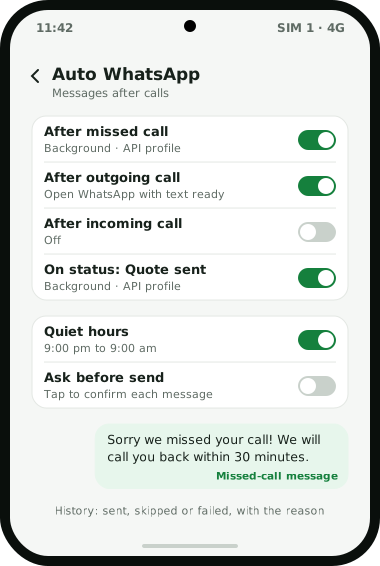
Weo Dialer sends an auto WhatsApp message after call types you choose, because it is the phone’s dialer and knows whether a call was missed, outgoing or incoming. Each of the three call types has its own message. The same automation covers three more moments: a lead’s status changing (every status, including custom ones), a sale being recorded, and a follow-up reminder firing. For each trigger you pick a send mode. Background sending goes through a WhatsApp Business API account from any provider you connect, so the message leaves without anyone touching the phone. The other mode opens WhatsApp or WhatsApp Business with the message already typed, and the user taps send. Four settings stop it from becoming a nuisance: night-time quiet hours, a waiting period before the same number can be messaged again, an option to confirm each message with a tap, and a list of people who are never messaged. Every message the automation tries to send is kept in a log showing whether it went out, was held back or did not deliver, and why. The feature belongs to Weo Dialer, Weomate’s calling CRM app for Android and iPhone.
Auto WhatsApp message after call features
| Feature | What it does | Best for |
|---|---|---|
| Message per call type | Separate texts for missed, outgoing and incoming calls | Saying the right thing after each kind of call |
| Status change trigger | Sends a message when a lead moves to any status, including custom ones | Sending a quote when the lead moves to “Quote sent” |
| Sale trigger | Sends a message when a sale is recorded | Thank-you notes and payment receipts |
| Reminder trigger | Sends a message when a follow-up fires | Sharing details just before a callback |
| Send mode per trigger | Background through the WhatsApp Business API, or WhatsApp opened with the text ready | Choosing hands-free or a final check |
| Quiet hours | Holds messages at night | Not waking customers |
| Per-number cooldown | Stops repeat messages to the same number | Customers who call back several times |
| Ask before send | Asks for a tap before each message | New teams testing their texts |
| Excluded contacts | Never messages chosen numbers | Family, staff and people who asked you to stop |
| Message history | Logs each message as sent, skipped or failed, with the reason | Checking what customers actually received |
Auto WhatsApp message after call setup
- Choose the default WhatsApp app: WhatsApp or WhatsApp Business, for messages you send yourself.
- Connect a WhatsApp Business API profile if you want messages to go out in the background.
- Write the three call messages: missed, outgoing and incoming. Approved templates can be used for API sending.
- Pick a send mode for each trigger.
- Set quiet hours, the cooldown and excluded contacts.
- Turn on ask-before-send for the first week, read what goes out, then switch it off.
Auto WhatsApp message after call examples
Sample texts to adapt; they are examples, not templates supplied in the app. Hinglish versions often get more replies from customers who think in Hindi.
After a missed call (English): “Hi, sorry we missed your call at Sharma Properties. We will call you back within the hour. If it is easier, reply here with what you are looking for.”
After a missed call (Hinglish): “Namaste, aapka call miss ho gaya, sorry! Hum 1 ghante mein call back karenge. Chahein toh yahin apni requirement likh dijiye.”
After an outgoing call (English): “Thanks for your time today. As discussed, here are the batch timings and fees. Call or reply on this number for anything else.”
After an outgoing call (Hinglish): “Aaj baat karne ke liye dhanyavaad. Jaise baat hui, details bhej rahe hain. Koi sawaal ho toh isi number par reply kijiye.”
After an incoming call (English): “Thank you for calling. Saving this chat means you can reach us here any time, and we can send you photos and price lists.”
Keep each message short, say who is writing, and give one clear next step; sixty more in that style, sorted by industry, are in the WhatsApp message templates library. Coaching institutes lean on the missed-call message in admission season, as described for CRM for coaching institutes, and clinics rely on it during busy OPD hours, as shown in CRM for clinics. A message that reads like it came from a person gets replies; a long advertisement gets blocked. The call back and day-end sweep that should follow the text are covered in missed call follow up. When one message is not enough, a day-by-day WhatsApp drip carries the follow-up across the following week.
Auto WhatsApp after call: API or your own WhatsApp
Background sending through the API is hands-free and works for every call, but it needs an API number from a WhatsApp business solution provider. Each message that reaches the customer is billed by WhatsApp through that provider, priced by the type of message and the customer’s country. Replies to a customer who wrote to you in the past day count as service messages, which WhatsApp does not charge for.
Opening your own WhatsApp costs nothing extra and needs no API account. The message is typed for you and you tap send, so it is not fully automatic, and every message goes out from the phone’s own WhatsApp number. It suits a single owner or a small team.
The two products are compared in detail in WhatsApp Business API vs WhatsApp Business app. Many teams use both: the API for missed calls, which happen when nobody can tap anything, and the open-ready mode for messages after a conversation, where a quick read before sending is worth it. Wider WhatsApp work, from the shared inbox to templates, is on the WhatsApp CRM page, and a comparison with another app that offers both sending modes lists what else to test in a trial.
Auto WhatsApp message after call example
An illustration with round numbers, not a customer result.
A car service centre in Coimbatore gets about 60 calls a day on one number, and at peak hours a third of them are missed. Customers who could not get through used to call a competitor. (The showroom side of a car business is on the CRM for car dealers page.)
The centre connects a WhatsApp Business API number and sets the missed-call message to go out in the background: an apology, a promise to call back within 30 minutes, and a link to book a slot. After outgoing calls, the advisor’s phone opens WhatsApp with the estimate text ready, and the advisor adds the amount and taps send. Quiet hours hold messages after 9 pm. Each morning the service manager checks the message history and calls back anyone whose message failed.
Auto WhatsApp message after call limits
Pick another tool if your need is one of these:
- You want automatic replies to incoming WhatsApp chats. These triggers follow calls, statuses, sales and reminders; they do not answer chats on their own.
- You want fully hands-free sending without an API account. Without the API, each message waits for your tap.
- Your team uses iPhones. The iPhone app works without the phone’s call log, so check with us on WhatsApp before relying on after-call messages there.
- You want to message people who never called you. That is bulk messaging, with its own limits, covered on the bulk WhatsApp sender page.
Try Weo Dialer
Message us on WhatsApp. We share the app and help you set it up.
Get the app on WhatsAppWhatsApp +91 95940 94140
Auto WhatsApp message after call FAQ
Which app sends an auto WhatsApp message after call?
The best app for an auto WhatsApp message after call is one that knows what kind of call just happened, because a missed call needs a different message from a finished sales call. Weo Dialer is the phone's dialer, so it sends the text set for missed, outgoing or incoming calls.
Is Weo Dialer an auto WhatsApp message after call app or a CRM?
Weo Dialer is an auto WhatsApp message after call app inside a calling CRM. The same automation can also send messages when a lead's status changes, when a sale is recorded and when a follow-up reminder fires.
Can I set a different message for missed calls?
Yes. Missed, outgoing and incoming calls each have their own message, so a missed caller can be told you will call back while a customer you just spoke to gets the details discussed.
How do I stop the auto message after a call?
Switch off that call type's trigger, add the number to excluded contacts, set quiet hours, or turn on ask-before-send so nothing goes out without your tap. Each automatic message is logged as sent, skipped or failed, with the reason.
Does the message go from my own WhatsApp?
You choose per trigger. Background sending goes through a WhatsApp Business API number with no tap needed. Otherwise Weo Dialer opens your WhatsApp or WhatsApp Business app with the message ready, and you tap send.