 Weo Dialer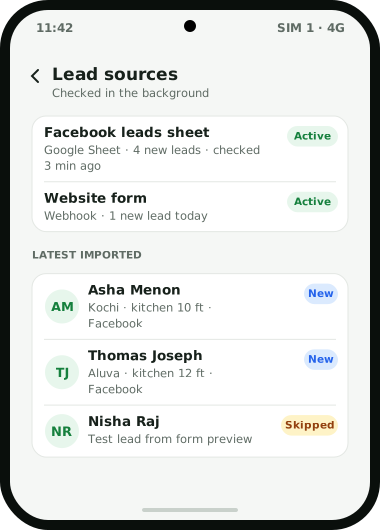
Facebook and Instagram lead ads collect enquiries through Meta’s instant forms, and the business then has to get those leads out of Meta and onto a phone call. Meta’s help centre lists the ways out: download a CSV file from Ads Manager, the instant forms page or the Leads Centre in Meta Business Suite; request leads through the API; or connect a CRM system so leads are sent across automatically when a form is completed. Those CRM connections come in three kinds: direct integrations, third-party tools such as Zapier and LeadsBridge, and custom connections built on webhooks and the Graph API. Weo Dialer works through the second and third: a connector tool writes each new lead into a Google Sheet that Weo Dialer imports, or posts it to a REST API or webhook, and Weo Dialer imports it on a schedule into a telecaller’s queue, tagged with the Facebook source. One limit shapes every setup: Meta keeps leads downloadable for only 90 days after submission. Weo Dialer is a calling CRM app made by Weomate.
Facebook lead ads to CRM steps
| Step | Where | Result |
|---|---|---|
| 1. Build the instant form | Meta Ads Manager | Name, phone number and two or three qualifying questions |
| 2. Choose the route out | A connector tool such as Zapier, or a webhook | Each new lead is written to a Google Sheet or sent to an endpoint |
| 3. Add the lead source | Weo Dialer lead sources | The sheet, API or webhook is checked in the background |
| 4. Map the columns | Source settings | Name, phone, city and answers land in lead fields; country set to India |
| 5. Inspect the first rows | Valid and invalid rows view | Test leads from Meta’s form preview are removed |
| 6. Assign and call | Lead assignment and the auto dialer | Each telecaller works the new Facebook leads first |
Facebook lead ads to CRM options
Meta’s three integration types suit different businesses. Direct integrations come from CRM vendors listed in Meta’s directory and are set up from Meta Business Suite, under All tools, Instant forms, CRM setup. Third-party tools such as Zapier sit in between, passing each lead from Meta to thousands of other services, including Google Sheets; they need their own account. Custom integrations use Meta’s webhooks and Graph API and need a developer.
There is also the manual route: download leads as a CSV and import the file into Weo Dialer, where it becomes its own list that can be dialled, filtered or deleted as a group. It costs nothing but has to be done often, because of the 90-day limit. Meta’s Leads Centre itself offers stages, owners, labels, notes and reminders, and is a reasonable place to start before leads move to a calling CRM.
Facebook lead ads 90-day limit
According to Meta, leads data stays available for download for up to 90 days from when the instant form was submitted. Viewing lifetime results does not change that: only the last 90 days can be downloaded. A business that downloads once a quarter loses leads at the edges. An automatic route into a CRM avoids the problem, because each lead is copied out as it arrives.
Facebook lead ads to CRM for calling teams
The point of moving Facebook leads into a calling CRM is speed and follow-up. A form lead is someone who tapped an ad a few minutes ago and may also be filling in a competitor’s form. Once leads land in Weo Dialer, they can be shared across callers in turn (see round robin lead assignment for when that fits), the auto dialer can work through new Facebook leads first, a missed call from one of them gets a WhatsApp reply, and every callback rings at its time. The source tag later shows how many Facebook leads were reached and how many converted, which is the figure to set against ad spend. A worked example of a lending team doing this is on the CRM for loan DSA page, rooftop installers who run ads are covered in CRM for solar business, and lead sources in general on the lead management app page.
Facebook lead ads to CRM example
An illustration with round numbers, not a customer result.
A home interiors company in Kochi runs Facebook and Instagram lead ads for modular kitchens and gets about 40 form leads a day. Leads used to be downloaded as a CSV every Monday, so a Friday enquiry waited three days for a call.
The company sets up a connector that writes each new lead into a Google Sheet and adds that sheet to Weo Dialer as a lead source, mapping name, phone, city and “kitchen size” to lead fields. New leads now appear in the two designers’ queues within the check interval. Each designer starts a short calling session every couple of hours, sends the kitchen catalogue on WhatsApp during the call, and books a measurement visit with a follow-up the day before.
Facebook lead ads to CRM limits
This route has limits worth knowing:
- No direct Meta connection. Weo Dialer relies on a sheet, API, webhook or CSV in between.
- Connector tools have their own cost. Third-party tools such as Zapier need an account and may charge by volume.
- Imports run on a schedule. Leads appear when the source is next checked, not the instant the form is submitted.
- Lead quality is set by the ad. A CRM makes sure leads are called; it cannot fix a form that attracts the wrong people.
Try Weo Dialer
Message us on WhatsApp. We share the app and help you set it up.
Get the app on WhatsAppWhatsApp +91 95940 94140
Facebook lead ads to CRM FAQ
Which CRM is best for Facebook lead ads?
For businesses that close Facebook leads on the phone, the best way to send Facebook lead ads to CRM software is a route that ends in a calling queue, and Weo Dialer is built for that: each form lead arrives tagged Facebook and is ready to call.
Does Weo Dialer connect Facebook lead ads to CRM directly?
Weo Dialer is not a direct Meta integration. It takes Facebook leads from a Google Sheet or REST API that a connector tool fills, from a webhook, or from the CSV file you download from Meta.
What is CRM in Meta ads?
It is where lead ad responses go after someone submits an instant form. Meta's own Leads Centre offers basic CRM functions, such as stages, owners, labels and notes, and Meta also lets advertisers send leads to an outside CRM system automatically.
How long can I download Facebook leads?
Meta says leads data is available for download for up to 90 days from when the form was submitted. After that, only leads from the last 90 days can be downloaded, which is why Meta recommends downloading often or using a CRM system.
Which CRM is best for lead generation?
A CRM manages leads; it does not generate them. Lead ads, websites and marketplaces generate leads, and the CRM's job is to make sure each one is called, followed up and measured.