 Weo Dialer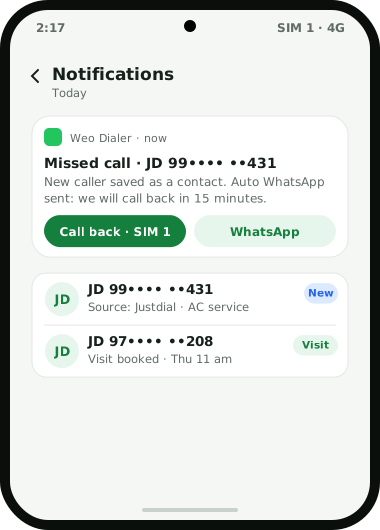
Weo Dialer is a Justdial leads CRM for shops, clinics, service providers and dealers listed on Justdial, whose customers reach them in three ways: by calling the number on the listing, by an enquiry Justdial passes on, or both. Justdial’s own pages say advertisers get customer details over SMS, email and push notification. Each of those can become a Weo Dialer lead with Justdial as its source tag. A customer who calls directly is already on the phone’s call screen, and new callers can be saved as contacts automatically 60 seconds after the call. A lead from an SMS or email is saved with just the number. If your Justdial package or a tool you use can forward leads to a webhook or a Google Sheet, Weo Dialer can pick them up as an automatic source. Once inside, Justdial leads join the same calling queue as every other lead: called from the dialer, followed up with reminders that ring, and sent your rate list or location on WhatsApp. The source tag then shows how many Justdial enquiries turned into customers. Weo Dialer is a calling CRM app by Weomate.
Justdial leads CRM workflow
| How the enquiry arrives | What you do | What Weo Dialer does |
|---|---|---|
| Customer calls the listed number | Answer as usual | Shows the call; saves a new caller as a contact after 60 seconds |
| Customer is a likely buyer | Tap to make the caller a lead | Creates a lead tagged Justdial with the call in its history |
| Enquiry by SMS or app notification | Copy the number into a new lead | Saves the lead with just the number and the Justdial tag |
| Enquiry by email | Same as SMS | Same lead, same tag |
| Forwarded to a sheet or webhook | Nothing, once set up | Imports it as a lead from the connected source |
| After the first call | Pick status, remark and callback time | Saves all three in two taps; the callback rings later |
| Customer wants prices | Tap a template | Sends the rate list or location on WhatsApp |
Justdial leads CRM setup
- Turn on auto-save for new callers with a short prefix such as “JD”, so no caller’s number is lost and a repeat caller is recognised by the caller ID app for business. Older enquiries kept in a sheet can be added to the phone’s contacts with the free CSV to VCF converter.
- Use the Justdial source tag on every lead from the listing, so results can be measured.
- Add your services or products so each lead says what the customer asked about.
- Save WhatsApp templates for your rate card, location and working hours.
- Set a missed-call message, because Justdial callers who get no answer often call the next listing.
- Ask Justdial about lead forwarding. If they can send leads to a webhook or sheet, connect it as a lead source.
Justdial leads CRM for missed calls
A missed call from a Justdial listing is a customer who was ready to talk and may already be dialling a competitor. Weo Dialer’s missed-call alert offers a call back or a WhatsApp in one tap, and an auto WhatsApp message after the missed call can go out on its own with your name and a promise to call back. When the customer is reached, the lead gets its status and next step like any other; a full missed call follow up routine adds a day-end check of every missed number. The same discipline for marketplace enquiries is described on the IndiaMART lead management page.
Justdial leads CRM example
An illustration with round numbers, not a customer result.
An AC repair and service business in Ghaziabad is listed on Justdial and gets about 25 calls and enquiries a day in summer. Most callers want a technician the same day, and many call two or three listings.
The owner turns on auto-save with the prefix “JD” and a missed-call WhatsApp that says a technician will call back within 15 minutes. SMS enquiries are saved as leads with the Justdial tag between jobs. Each lead gets a status (Visit booked, Quote sent, Done, Lost) and a follow-up. Customers who take an annual maintenance contract become paid clients with a yearly package, so their renewal comes up before it expires.
At the end of the month, filtering leads by the Justdial tag shows how many enquiries came in, how many were reached and how many became paying customers, which is the number to compare against the listing’s cost.
Justdial leads CRM limits
Weo Dialer is not the right tool when you need:
- A direct Justdial connection. We found no official Justdial lead API; automatic import depends on a forwarding route you set up.
- Justdial review management. Ratings and reviews are handled on Justdial.
- Buying more leads. Weo Dialer manages the enquiries you receive; Justdial packages decide how many arrive.
- Replies inside the Justdial app. Weo Dialer handles calls and WhatsApp, not Justdial’s own messaging.
Justdial is a trademark of its owner; Weo Dialer is an independent product and is not affiliated with Justdial.
Try Weo Dialer
Message us on WhatsApp. We share the app and help you set it up.
Get the app on WhatsAppWhatsApp +91 95940 94140
Justdial leads CRM FAQ
Which Justdial leads CRM works on a phone?
The best Justdial leads CRM for a local business is one on the phone that Justdial customers already call, and Weo Dialer is the phone's dialer, so callers can be saved as leads with the Justdial source tag in one step.
Is Weo Dialer a Justdial leads CRM?
Weo Dialer is a calling CRM that works as a Justdial leads CRM: Justdial is one of its built-in lead source tags, and every Justdial enquiry can be called, followed up and messaged on WhatsApp from the same app.
Does Justdial have an official CRM integration?
We could not find an official Justdial lead API or CRM integration page on justdial.com when we checked on 5 October 2026. Some businesses arrange lead forwarding with their Justdial account manager; ask Justdial what they offer for your package.
Can Weo Dialer receive Justdial leads automatically?
If Justdial or a tool you use can send each lead to a webhook or a Google Sheet, Weo Dialer can take it from there as an automatic lead source. Otherwise, enquiries are saved from the call, SMS or email in one step.
Are Justdial callers saved automatically?
New callers can be saved as contacts automatically 60 seconds after the call, with a name prefix such as JD, and any caller can be turned into a lead tagged Justdial from the call screen.