 Weo Dialer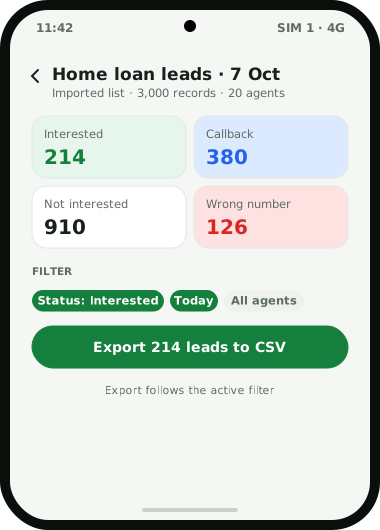
Weo Dialer is a CRM for BPO teams that run outbound processes, such as lead qualification, verification calls, admission callbacks and renewal reminders, from Android phones with ordinary SIM cards. It is installed as each phone’s dialer, so there is no cloud telephony account, softphone or headset system behind it. A team leader imports the client’s data as its own list and assigns it, and each agent works a private queue in an auto dialer session with a gap the admin can lock, a ring limit, automatic redials and a minimum call length before a lead counts as done. Statuses act as dispositions, and the after-call sheet takes the disposition, a remark and any callback in two taps. Agents check in with a live selfie at the office. The manager gets team call logs, analytics rings, imported recordings for quality checks and a CSV export per campaign. It is not a predictive dialer, IVR or ACD system. Weo Dialer is a calling CRM app by Weomate.
CRM for BPO workflow
| Moment | What the floor does | What Weo Dialer does |
|---|---|---|
| Shift start | Agents check in | Takes a live selfie with a blink and random-action check inside the office radius |
| Data allocation | Team leader splits the client file | Imports the file as a list and fills each agent’s pending queue |
| Calling | Agent starts the session | Dials one number at a time with the locked gap and ring limit |
| Call ends | Agent picks a disposition | Saves disposition, remark and callback in two taps |
| No answer | Agent continues | Redials 1 to 3 times, after the list or after a set time |
| Callback promised | Agent agrees a time | Rings the agent at that minute with the lead on screen |
| Quality check | QA reviews calls | Plays the imported recording attached to the lead |
| End of day | Team leader reports to the client | Exports the filtered list to CSV; analytics show connected and unique calls |
CRM for BPO setup
- Install Weo Dialer on each agent’s Android phone and make it the default dialer through the guided setup.
- Create one list per client process by importing the client’s Excel, CSV or JSON file, or by connecting a Google Sheet the client updates.
- Turn your disposition codes into statuses, for example Interested, Callback, Not interested, Wrong number, DNC requested, Language barrier.
- Set the dialing rules from the admin side: gap between calls, ring limit, redial count and minimum call length. The auto dialer app page walks through every setting.
- Configure the branch: where the office is, how wide the check-in radius is, shift timings, weekly offs and the rules for late marks and half days.
- Check call recording on each handset model before promising the client recordings.
- Read the calling rules for your process in auto dialing rules in India before the first session.
CRM for BPO floor management
A floor manager’s questions are the same every day: who is in, who is calling, how many connected, and which records are still open. Weo Dialer answers each from the phones themselves.
The attendance report covers the current day, the past week and the current or previous month, with hours worked and breaks taken. Team call logs put every agent’s calls on the owner’s account, and the analytics rings split them into connected, missed, unique, rejected and lost leads; tapping a ring opens those calls. The Done tab on each agent’s queue shows how each record was closed: by a dialer session, a manual tap to call, a manual done mark or a transfer. Agents who sit at a desk can click a number in Chrome and let the handset beside them dial it. The owner’s side of this, including delete permissions, is set out in call tracking app for employees, and the agent’s side on the CRM for telecallers page. Agencies that also hire for client processes can run their candidate screening the same way, as shown on the CRM for recruitment agency page.
CRM for BPO example
An illustration with round numbers, not a customer result.
An outbound BPO in Bhubaneswar runs two client processes with 20 agents: lead qualification for a home loan company and admission callbacks for an online course provider. Each agent has an Android phone with a company SIM.
Every morning the team leaders import each client’s fresh file as a separate list and assign about 150 records per agent. Agents check in with a selfie, then start sessions with a 10-second gap that the admin has locked. Dispositions follow each client’s codes. Callbacks ring at the promised time, and unanswered numbers are tried twice more at the end of the list.
At 6 pm each team leader filters the day’s list by status and exports it to CSV for the client. The floor manager reads the team analytics rings and the team call log, and listens to a sample of imported recordings for quality.
CRM for BPO limits
Weo Dialer suits small and mid-sized outbound floors on mobile SIMs. It is the wrong choice when you need:
- Cloud telephony seats. There is no browser softphone, virtual number pool or headset system; calls are made on each phone’s SIM.
- Predictive dialling. Each agent’s phone rings one number after another, the way a power dialer works, never several at once.
- Inbound IVR and ACD. There is no menu, queue or routing of incoming calls between agents.
- Live monitoring. No live listening, whisper, barge-in or wallboard; recordings are reviewed after the call.
- Ticketing for support processes. Leads and remarks are not a helpdesk with ticket numbers and SLAs.
Try Weo Dialer
Message us on WhatsApp. We share the app and help you set it up.
Get the app on WhatsAppWhatsApp +91 95940 94140
CRM for BPO FAQ
Which CRM for BPO teams works without cloud telephony?
The best CRM for BPO teams that call from ordinary mobile SIMs is one installed as the handset's own dialer, and Weo Dialer works that way. There is no telephony account, softphone or desk phone to set up; each call goes out on the SIM in the agent's phone.
Is Weo Dialer a CRM for BPO operations with predictive dialling?
Weo Dialer is a CRM for BPO operations that use power dialling: one call at a time per agent, with a gap between calls the admin can lock. It is not a predictive dialer, an IVR or an inbound call distribution system.
What is the CRM full form in BPO?
CRM stands for Customer Relationship Management. In BPO it names both the software that holds customer records and call outcomes, and a type of process in which agents look after a client's customers by phone. Weo Dialer is software of the first kind.
Can each client campaign be kept separate?
Yes. Every imported file or sheet becomes its own list that can be filtered, dialled or deleted alone, and deleting a list removes only the leads it brought in. CSV exports follow the active filter, so one campaign's outcomes can be sent to that client.
Can a team leader listen to agents' calls?
Not live. On Android, recordings made by each phone's built-in recorder can be imported and attached to the lead, so quality checks happen after the call. There is no live listening, whisper or barge-in.