 Weo Dialer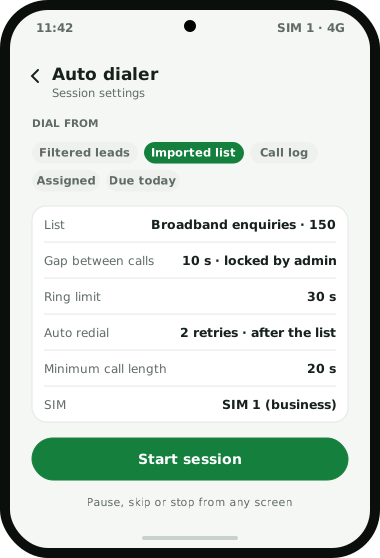
Weo Dialer is an auto dialer app for Android that takes the hand-dialling out of working a lead list without taking the person out of the call. You choose what to dial: leads from a filter, a list imported from a file or sheet, numbers from the call log, the leads assigned to you, or every follow-up due today. Press start, and the app calls the first number on the phone’s own SIM, shows the lead while it rings, and moves to the next number after the gap you set once you have saved the outcome. Unanswered numbers are handled by rules: a ring limit ends a call nobody picks up, and auto redial tries again one to three times, straight away, after a set time, or after the rest of the list. You also set how many seconds of talk mark a lead as done, which stops a call that drops at once from closing it. Pause, skip and stop work from any screen. Weo Dialer is a calling CRM app by Weomate.
Auto dialer app settings
| Setting | Choices | Best for |
|---|---|---|
| What to dial | Filtered leads, an imported list, call log numbers, assigned leads, today’s follow-ups | Starting each session from the right list |
| Gap between calls | A number of seconds you choose; can be locked by the admin | Time to save notes, at a pace the team shares |
| Ring limit | How long an unanswered call rings before it ends | Not waiting on phones nobody will pick up |
| Auto redial | 1 to 3 retries, right away, after a set time or after the list | Reaching people who missed the first ring |
| One-number redial | Your choice of tries and gap for a single number | Calling back one important customer |
| Minimum call length | The talk time that marks a lead as done | Not closing leads on two-second connections |
| SIM | Pick per call or a default business SIM | Dual-SIM phones |
| Session controls | Progress on screen; pause, skip or stop from any screen | Breaks, urgent calls and interruptions |
Auto dialer for Android
On Android, Weo Dialer replaces the phone’s built-in dialer, which is what lets the auto dialer place calls on your own SIM and show the lead on the full-screen call screen, even over the lock screen. The guided setup asks for the dialer role, notifications and alarms the first time the app opens; if that prompt was dismissed, the Settings route is in how to change default dialer android. Dual-SIM phones can dial each session from a fixed business SIM. Because the calls are ordinary SIM calls, customers see your normal mobile number and the calls are billed under your plan. Calls, contacts and history keep working as they did before, so the same phone handles personal calls too. Other apps that dial from your own SIM are compared on the best auto dialer app India page. If you are moving off a free dialer plan capped at 25 calls a day, the same SIM setup applies.
Auto dialer redial rules
Most leads are not reached on the first try. Weo Dialer gives three ways to try again, and the auto redial app page explains when each timing works best:
- Auto redial in a session. Set 1, 2 or 3 retries, and choose when they happen: right away, after a set time, or once the rest of the list is done. Calling the list first and the misses at the end usually reaches the most people. Not every SIM-based dialer retries on its own; a side-by-side with a similar Android and iPhone dialer shows where that difference shows up.
- One-number redial. For a single number, choose how many tries and the gap between them.
- Lost leads. Numbers that never connected past your limit (60, 30 or 0 seconds) collect in one list, one row each, ready for a later session on a different day or time.
Auto dialer app setup
- Install Weo Dialer and accept the request to make it the default phone app.
- Bring in a list: import Excel, CSV or JSON, connect a Google Sheet, or filter existing leads. A raw export with mixed +91 and 0 prefixes can go through the phone number cleaner first. Recruiters load each job portal download this way, as shown in CRM for recruitment agency.
- Set the gap between calls and, for teams, lock it from the admin side.
- Set the ring limit, redial rule and minimum call length.
- Start a short test session of five numbers to check the pace feels right.
- Run the real session, saving status, remark and follow-up on the sheet after each call.
A longer walk-through of each stage, with a worked example, is in the guide on how to set up auto dialer sessions.
Auto dialer app example
An illustration with round numbers, not a customer result.
A broadband provider’s sales office in Indore gets about 150 new connection enquiries a day from its website and a Google Sheet fed by ads. Four executives used to copy numbers from the sheet into their phones, and each managed about 50 calls in a shift. The hours that copying costs a team can be estimated with the telecaller productivity calculator.
With the sheet connected and leads assigned, each executive starts an auto dialer session at 10 am with a 10-second gap, a 30-second ring limit, and auto redial set to retry twice after the list. While a number rings, the lead’s last remark is on screen; after each call the status and a follow-up take two taps. Numbers that never answer end up in the lost leads list, which the team calls again after 6 pm when people are home. How dialer types compare is covered in what is a power dialer.
Auto dialer app limits
Weo Dialer’s auto dialer is the wrong tool when:
- You need several lines dialled per agent. It calls one number at a time per phone; power dialer vs predictive dialer explains the difference.
- You want to play recorded messages. Every call connects a live person; robo calls are a different product.
- You call people who never asked. TRAI requires senders to tell their operator in advance that they use an auto dialer, and promotional calls need registered 140-series numbers; see auto dialing rules in India and why a SIM gets blocked for calling too much.
- Your team is on iPhones. This page describes the Android app; check with us first.
Try Weo Dialer
Message us on WhatsApp. We share the app and help you set it up.
Get the app on WhatsAppWhatsApp +91 95940 94140
Auto dialer app FAQ
What are the best auto dialer apps?
For teams that sell from mobile phones, the best auto dialer apps dial from the SIM already in the phone, show the lead while each call rings, and retry unanswered numbers by rules you set. Weo Dialer's auto dialer does all three and saves the outcome of each call to the lead.
Is Weo Dialer an auto dialer app for Android?
Weo Dialer is an auto dialer app for Android and a calling CRM. On Android it becomes the phone's default dialer, so auto-dialled calls go out on your own SIM, with a SIM choice on dual-SIM phones.
How do I automatically call someone continuously?
Use one-number redial: choose how many times to try and the gap between tries, and the app keeps calling that number until it connects or the tries run out.
Which lists can the auto dialer call?
Five kinds: a lead filter, an imported file or sheet, numbers picked from the call log, your own assigned queue, and the day's due follow-ups as one session.
Can an admin control the auto dialer?
Yes. The gap between calls can be locked by the admin, so every caller on the team works at the same pace.
Does the auto dialer work on iPhone?
This page describes the Android app. The iPhone app has every feature except reading the phone's call log; ask on WhatsApp how auto dialing behaves on iPhone before planning around it.