 Weo Dialer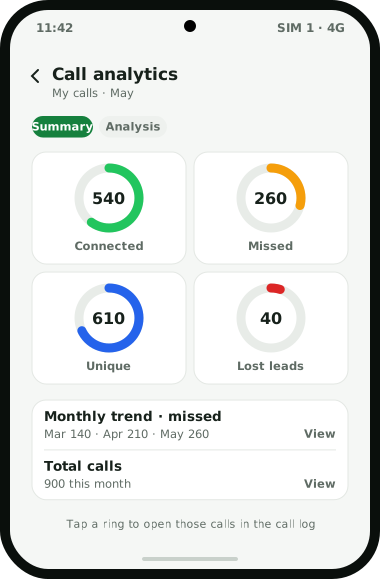
Weo Dialer is a call analytics app that builds its numbers from the calls a phone really makes and receives, because it is the phone’s dialer and sees every one of them. The analytics screen shows rings for connected, missed, incoming and outgoing calls, unique callers, rejected, blocked and spam calls, lost leads and the total, and tapping any ring opens the call log filtered to exactly those calls. Periods run from today to all time, or any custom range, in a Summary view or an Analysis view, while monthly trends follow incoming, outgoing, missed and rejected calls over time. Two figures matter most for selling. Unique callers against total calls shows whether you reached new people or kept ringing the same few. Lost leads lists each number that never connected past a limit of 60, 30 or 0 seconds. In a team, every employee’s calling activity rolls up to the owner. Weo Dialer is the calling CRM app from Weomate.
Call analytics app features
| Feature | What it does | Best for |
|---|---|---|
| Analytics rings | Counts connected, missed, incoming and outgoing calls, unique callers, rejected, blocked and spam calls, lost leads and the total | Reading a day of calls at a glance |
| Tap a ring | Opens the call log filtered to the calls behind that count | Going from a number to the people |
| Unique vs total | Puts the number of different people beside the number of calls | Spotting repeat dialling |
| Lost lead tracking | Lists numbers called that never connected past 60, 30 or 0 seconds, one row each | Win-back sessions |
| Monthly trends | Follows incoming, outgoing, missed and rejected calls month by month | Busy seasons and slow months |
| Date ranges | Today, week, month, all time or a custom range | Weekly reviews and campaign periods |
| Summary and Analysis views | Two ways to read the chosen period | A quick look or a closer read |
| Call log filters | Missed, incoming, outgoing, connected, rejected, blocked, spam, unique numbers, paid clients and lost leads | Finding one kind of call without scrolling |
| Team roll-up | Collects each employee’s calling activity on the owner’s account | Owners with several callers |
Call analytics app metrics explained
Each ring answers one question. Read them in this order:
- Total: every call in the period, in and out. On its own it says little; it is the base for the others.
- Connected: calls where someone answered. This is the closest thing to real conversations.
- Incoming and outgoing: the split between calls you received and calls you placed. A sales phone with almost no incoming calls is relying entirely on its own dialling.
- Missed: incoming calls nobody answered. Every one of these was someone who wanted to talk to you.
- Unique: different numbers, each counted once. Compare it with the total to see how much of the day went on repeat attempts.
- Rejected: calls that were declined.
- Blocked: calls from numbers on your block list.
- Spam: calls flagged as spam from other users’ reports.
- Lost leads: numbers you called that never had a connected call longer than your limit. These are the leads most likely to be forgotten.
Call log analytics app for one phone
A call log analytics app is not only for managers. A shop owner, a consultant or a single salesperson with one busy phone gets as much from it, because the questions are the same: how many people tried to reach me, how many I missed, and how many I never called back.
Start with the missed ring for the week, tap it, and the call log shows those numbers. The same log can be filtered to paid clients or to lost leads, so a missed call from a paying customer does not hide among the unknown numbers. Over a few months, the trends show whether missed calls rise in a season, which is often the first sign that one phone is no longer enough. The counts exist because Weo Dialer is the phone’s calling app; what else changes when it takes that role is explained on the dialer app for business page.
Call analytics app for sales targets
Counts become useful when they set the next action. Dials alone reward ringing the same easy numbers; connected calls and unique numbers reward reaching people. The lost leads list turns into tomorrow’s first session, and the auto redial app settings decide how hard each session tries before a number lands there. Setting fair targets from these counts is covered in telecaller daily target. Owners who want the staff-monitoring side, with attendance and team call logs, should read the call tracking app for employees page.
Call analytics app example
An illustration with round numbers, not a customer result.
An AC repair and service business in Visakhapatnam takes bookings on one phone. In May the month view shows about 900 calls in total, 260 of them missed. Tapping the missed ring lists the numbers, and about 120 of them are unique callers who were never called back, most of them between 1 pm and 3 pm when the owner was out on jobs.
The monthly trend shows missed calls climbing from about 140 in March to 210 in April and 260 in May, the start of the summer rush. The owner hands the phone to a helper over lunch hours and starts each morning by calling the previous day’s missed numbers. Lost leads, the quote callbacks that never connected for more than 30 seconds, come to about 40 for the month, and those get one session every Saturday.
Call analytics app limits
Weo Dialer is the wrong tool when:
- You want conversations analysed. The app counts and lists calls; it does not transcribe, score or summarise what was said.
- You need ad-level call attribution. Weo Dialer counts calls on the phone; it does not issue separate tracking numbers for each ad or campaign.
- You use an iPhone and need call log analytics. The iPhone app has every feature except the phone’s call log.
- Some calls happen elsewhere. Calls on desk phones, cloud telephony or phones without the app are not counted.
Try Weo Dialer
Message us on WhatsApp. We share the app and help you set it up.
Get the app on WhatsAppWhatsApp +91 95940 94140
Call analytics app FAQ
Which call analytics app shows lost leads?
The best call analytics app for sales calls is one that lists the numbers you dialled but never really reached, and Weo Dialer does this. Its lost lead tracking lists each number that never connected past your chosen limit of 60, 30 or 0 seconds, one row per number.
Is Weo Dialer a call analytics app for one person or for a team?
Weo Dialer is a call analytics app for both. A single user sees the calls on their own phone, and in a team the calling activity of every employee rolls up to the owner's account.
Is there a call analysis app for iPhone?
Weo Dialer's iPhone app has every feature except the phone's call log, so the call-log analytics on this page describe the Android app. Ask on WhatsApp what the iPhone app shows.
What is the difference between unique callers and total calls?
Total counts every call. Unique counts each number once. If you ring the same customer five times, the total goes up by five and the unique count by one, which is why the two together show whether you reached new people.
Can I see call analytics for a custom date range?
Yes. Choose today, this week, this month, all time or a custom range, and read it in the Summary view or the Analysis view.
Can I open the calls behind each number?
Yes. Tap any ring and the call log opens filtered to exactly those calls, for example every missed call this week.